Quick answer
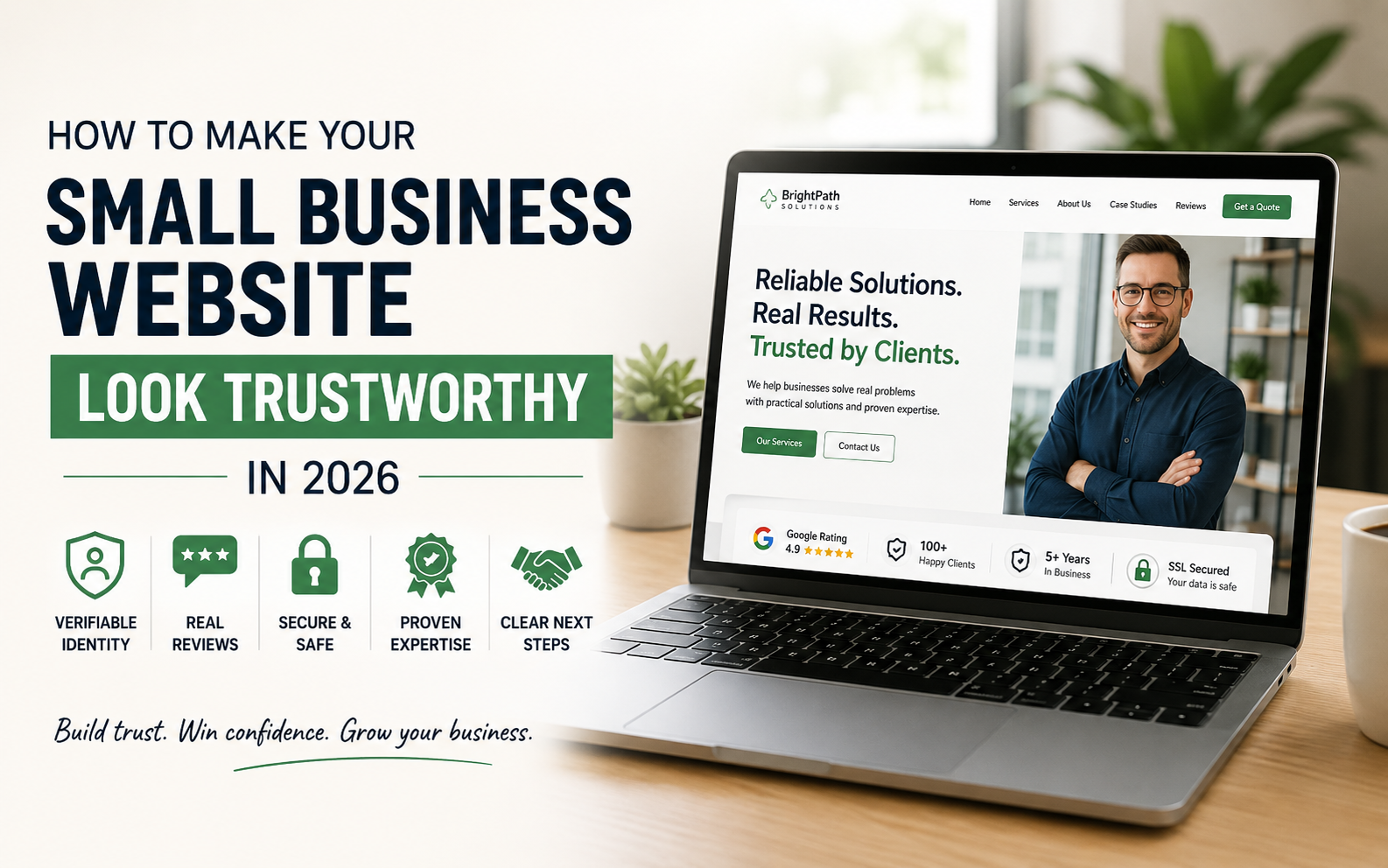
A trustworthy small-business website makes five things agree: the business identity, the offer, the evidence, the safety signals and the next step. Visitors should be able to verify who you are, understand exactly what you provide, see proof that supports your claims, feel safe sharing information or money, and know what will happen after they contact or buy from you.
Trust does not come from adding a badge to an otherwise unclear website. It comes from consistent, checkable information across the search result, website, business listings, social profiles, enquiry or booking process, checkout and follow-up communication.
Key takeaways
- A polished design can support trust, but it cannot replace a verifiable business identity, clear policies, genuine proof or a working customer journey.
- Buyers require more evidence as the financial, personal or operational risk of the decision increases.
- Independent proof is generally stronger than an unsupported claim made by the business itself.
- Contact, booking and checkout paths should be tested as carefully as the homepage.
- Your website, Google Business Profile, social accounts, payment pages and emails should tell the same story.
- Fix the earliest serious trust break before paying for more traffic or redesigning the entire site.
In this guide
- The five-layer Trust Alignment Test
- The website trust evidence hierarchy
- The 2026 trust checklist
- Trust requirements by decision risk
- Trust signals by business type
- A practical 30-minute trust audit
- When to patch, redesign or rebuild
- Frequently asked questions
Why website trust matters more in 2026
Customers have more reasons to verify a business before they act. AI-generated sites, copied product pages, fabricated reviews, cloned brands and convincing scam pages have made visual polish a weaker proxy for legitimacy.
A June 2026 Pantheon-commissioned survey of 1,000 US adults, fielded by Dynata, reported that 92% of respondents felt AI-generated content was making it harder to determine whether a website was legitimate. The same survey found that slow or buggy performance could cause respondents to misidentify a legitimate website as suspicious. This is a vendor-commissioned US survey rather than a universal benchmark, but it illustrates an important commercial reality: ordinary website neglect can now resemble risk.
At the same time, a website has become a normal verification layer. The UK Government’s 2026 Business Data Survey reported that 78% of surveyed businesses had a website, including 84% of micro businesses and 76% of sole traders. A customer comparing two unfamiliar providers may reasonably interpret the clearer, more verifiable digital presence as the safer choice – even when both businesses are operationally capable.
In my website audits, I often see a gap between the quality of the business and the quality of the evidence available online. The company may be experienced, responsive and excellent at its work, but the website still uses vague claims, old photos, incomplete contact information or a form that gives no indication of what happens next. The customer can only evaluate the evidence they can see.
Kanika’s perspective: A trustworthy website is not the one making the most claims. It is the one making the fewest important claims without evidence.
This guide focuses specifically on legitimacy and decision confidence. For the broader relationship between trust, usability, messaging and conversion, see the high-converting business website checklist.
Your business may be credible. Does your website prove it?
I can review your website’s trust signals, messaging and enquiry journey and identify the issues most likely to make potential customers hesitate.
What makes a small-business website trustworthy?
A trustworthy website answers five questions quickly:
- Identity: Who is behind this business, and can I verify it?
- Relevance: Does it provide the exact service or product I need in my market?
- Evidence: What supports its claims, experience and ability to deliver?
- Safety: What protects my information, money and expectations?
- Continuity: Do the website, listings, policies, checkout and follow-up agree?
These questions form the practical framework I use below.
The five-layer Trust Alignment Test
The Trust Alignment Test is a practical assessment framework developed by Kanika Gupta for reviewing small-business websites. It is not a certification or a Google ranking system. It helps identify where a prospective customer is most likely to doubt the business before contacting, booking or paying.
| Trust layer | Customer question | Strong evidence | Common trust break |
|---|---|---|---|
| Identity | Is this a real, accountable business? | Matching business name, domain, people, contact details and location or service area | Conflicting names, anonymous About page or unverifiable address |
| Relevance | Is this offer meant for someone like me? | Specific service, customer, market, scope and limitations | Generic “solutions,” unclear geography or missing product details |
| Evidence | Can this business do what it claims? | Real work, attributed reviews, credentials, case context and third-party references | Stock-only imagery, anonymous testimonials or unsupported superlatives |
| Safety | What happens to my information and money? | HTTPS, minimal forms, clear policies, reputable payment path and accessible support | Broken forms, surprise fees, vague refunds or unexplained redirects |
| Continuity | Does the complete journey agree? | Consistent facts from search result to confirmation and follow-up | Different prices, names, domains, promises or contact details across steps |
The value of this framework is diagnostic. A business does not automatically need a redesign because one layer is weak. It needs the earliest serious break repaired first.
The website trust evidence hierarchy
Not all trust signals carry the same weight. A claim becomes stronger as the evidence becomes easier to verify independently.
| Evidence level | Example | How a buyer may interpret it |
|---|---|---|
| Claim | “We provide high-quality work.” | Easy to publish; difficult to verify |
| Specific owned evidence | A detailed service process, named team member or project photographs with context | More credible because it contains observable detail |
| Attributed customer evidence | A testimonial naming the service, customer and source, used with permission | Useful social proof with context |
| Independent evidence | Public review profile, professional register, certification issuer, media reference or partner directory | Stronger verification outside the company’s own website |
| Journey evidence | The quote, booking, delivery, refund and support experience matches what the site promised | Trust confirmed through actual behaviour |
This hierarchy does not mean every business needs awards, press coverage or a large review count. A new business can still be trustworthy when it is transparent about being new and provides specific, honest evidence about the people, offer and process.
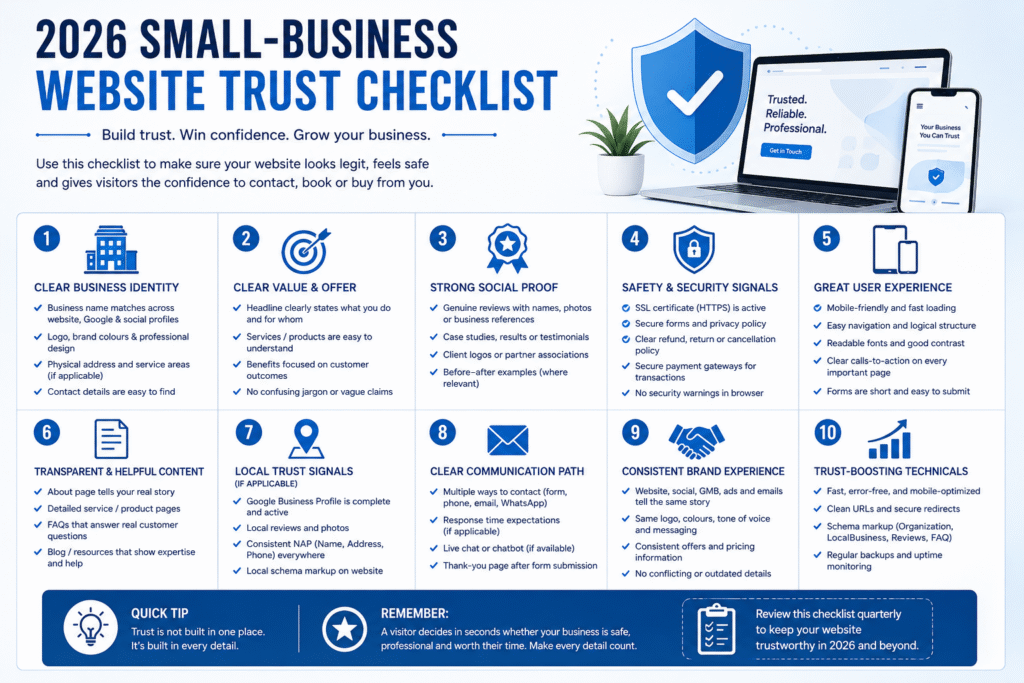
The 2026 small-business website trust checklist
1. Use a domain and business email that match the company
Choose a domain that is recognisable and consistent with the business name customers see on quotes, invoices, listings and social profiles. Use an email address at that domain for important customer communication when possible.
A free email address does not prove a business is illegitimate, and a branded email does not prove it is trustworthy. The value comes from alignment: the sender, domain and business identity agree.
2. Make the business identity easy to verify
Publish the trading or legal name where appropriate, a genuine contact method, and a real location or clearly defined service area. Show registration, licence or professional details when customers would reasonably expect them in that market.
Do not invent offices in the United States, United Kingdom, Australia, Canada or UAE to appear local. A remote specialist can be credible by explaining where the business is based, which markets it serves and how remote delivery works.
For a home-based business, privacy still matters. Publish the service area and a legitimate business mailing address or PO box where suitable rather than exposing unnecessary personal information.
3. Put accountable people behind the company
Your About page should contain facts that a generic template could not reproduce: who founded the business, relevant experience, how the team works, what it specialises in and what customers can expect.
Use real photographs when appropriate, or show the team, workshop, clinic, vehicle, office, product or working process. If you prefer not to publish personal images, strengthen the page with named roles, a genuine founder story, verifiable professional profiles and concrete operational detail.
4. Explain the offer in customer language
A new visitor should understand what you provide, who it is for, where it is available and what is outside scope. Replace broad labels such as “solutions” or “innovation” with specific services, products, applications or outcomes.
Clear scope is a trust signal because it shows the business understands its own work and is willing to set expectations.
5. Replace vague promises with specific evidence
Useful evidence can include:
- real project or product photographs with meaningful captions;
- case studies explaining the problem, work and verified outcome;
- named credentials linked to the issuing organisation;
- attributed testimonials used with permission;
- links to independent review profiles;
- product materials, dimensions, compatibility and care information;
- service areas, delivery expectations and response windows;
- limitations or exclusions stated before the customer commits.
Place evidence near the decision it supports. Relevant reviews belong near the service or enquiry action, delivery information near the purchase decision, and credentials near the claim of expertise.
6. Use real work without misrepresenting stock imagery
Real images help buyers understand capability and reduce uncertainty. Stock photography can support a page, but it should not be presented as your team, premises, clients or completed work.
For ecommerce, inconsistent supplier images, unexplained mock-ups or photographs that do not match the delivered product can weaken trust even when the item itself is legitimate.
7. Make price and scope more predictable
You do not always need to publish a fixed price for bespoke work. You should explain what affects cost, what is commonly included, whether a minimum engagement applies and what information is required for an accurate quotation.
For ecommerce, show the full product price, currency, shipping expectations and likely additional charges before the customer reaches the final payment step. For market-specific planning ranges, link to the 2026 small-business website cost guide.
8. Keep policies understandable and consistent
Return, cancellation, shipping, privacy, warranty and terms pages should match the offer shown elsewhere. Remove template placeholders, references to the wrong country and contradictory timeframes.
If a product page promises 30-day returns while the policy says 14 days, the customer must decide which statement is real. That contradiction is a trust problem even if each page looks professional.
9. Use reviews honestly
Do not fabricate, rewrite or bulk-generate testimonials. Attribute reviews accurately, preserve the customer’s meaning and link to the source where practical.
Specificity and relevance matter more than a wall of anonymous five-star quotes. A thoughtful response to a mixed review may sometimes build more confidence than a page that appears unrealistically perfect because it demonstrates accountability.
10. Keep contact and conversion paths visible and working
Customers should not have to hunt for a phone number, email address, appointment button, quotation route or checkout action. Place the primary action where it is contextually useful, including on mobile.
Test forms and booking paths regularly. Confirm that:
- submission succeeds;
- the notification reaches the right person;
- error messages are understandable;
- fields are genuinely necessary;
- mobile keyboards and field types are appropriate;
- privacy information is available before submission;
- the confirmation explains what will happen next.
11. Make the next step predictable
“Submit” describes the button, not the business response. Explain whether you will reply by email or phone, the usual response window, what information may be requested and whether the first consultation is free, exploratory or chargeable.
Predictability matters especially for healthcare, professional services, high-value home improvements and custom B2B work, where an enquiry can feel consequential.
12. Treat mobile performance as part of credibility
Many customers verify a business from a phone while comparing quotes, visiting a location or discussing the decision with someone else. Check that the first mobile screen identifies the business, text is readable, key images load, the phone number works and the main action is easy to use.
Performance should not be presented as a magic ranking or conversion guarantee. It is part of the overall experience. Google also advises site owners to evaluate page experience as a whole rather than treating one metric as the single answer.
13. Keep the journey visually and factually continuous
Unexpected changes in domain, business name, currency, design, policy or payment experience can make customers feel they have left the original business.
If a trusted third party handles scheduling or payment, introduce that transition clearly. The customer should understand why they are being redirected and whether the same business remains responsible for the transaction.
14. Protect data without using meaningless security claims
Use HTTPS, maintain the platform, limit the information collected, control access, keep backups, and use reputable payment providers. Do not display a generic “100% secure” graphic as a substitute for operational safeguards.
The risk is not theoretical. auDA’s 2026 Digital Lives of Australians research reported that 92% of surveyed Australian small businesses held personal or sensitive data, while only 26% felt very confident they could keep business data secure online. The exact percentages are market-specific, but the operational lesson applies broadly: even a small website may handle valuable customer information.
15. Remove visible signs of abandonment
Broken links, missing images, expired promotions, outdated team members, old events, failed discount codes and unanswered form submissions suggest nobody is maintaining the experience.
Update or remove stale content instead of hiding it behind a new homepage design. A maintained modest website can feel more trustworthy than an ambitious site with obvious neglect.
Match trust evidence to the decision risk
The same trust checklist should not be applied mechanically to every website. Evidence requirements rise with the customer’s risk.
| Decision risk | Example | Minimum useful reassurance |
|---|---|---|
| Low | Reading an article or joining a newsletter | Clear author or business identity, privacy notice and honest subscription expectations |
| Moderate | Booking a salon, buying a standard product or requesting a quote | Service details, real contact path, relevant reviews, cancellation/return terms and a predictable next step |
| High | Paying a deposit, choosing a clinic, commissioning bespoke work or selecting a long-term B2B supplier | Named expertise, detailed process, limitations, credentials where relevant, contract/payment clarity, data handling and accountable support |
The mistake is not having fewer trust signals than a larger competitor. It is asking for a high-risk action before providing high-risk reassurance.
Trust signals by business type
Local services and contractors
- real project photographs and useful context;
- named owner or team;
- service area and type of work;
- licence and insurance details where relevant;
- a clear quotation and deposit process;
- independent reviews;
- matching phone, domain and business-listing information.
Consultants and professional services
- specific expertise and ideal engagement;
- a clear process explained without jargon;
- verifiable credentials, publications or memberships;
- case examples that protect confidentiality;
- boundaries for the first consultation;
- privacy-aware enquiry forms.
Ecommerce brands
- consistent identity from product page to payment confirmation;
- real product photography and complete specifications;
- shipping, returns and contact information near purchase decisions;
- authentic reviews;
- accurate stock, currency and delivery expectations;
- an understandable and recognisable checkout;
- working policies without template residue.
The US Federal Trade Commission advises online shoppers to research sellers, review return and refund policies and use safer payment methods. Those consumer checks reveal what unfamiliar ecommerce brands need to make easy to verify.
Clinics and appointment-based businesses
- practitioner names, roles and credentials;
- genuine location and opening information;
- clear treatment or service scope;
- what happens before and after booking;
- minimal, secure forms;
- privacy, cancellation and urgent-care boundaries;
- reassurance close to the booking action.
Manufacturers and B2B suppliers
- specific capabilities, materials, tolerances or applications;
- certifications linked to their scope and issuing body;
- facility, machinery and quality-process evidence;
- geographic and production capacity stated accurately;
- a clear RFQ route and required specification fields;
- named sales or technical contact;
- export, delivery and compliance information where relevant.
A practical 30-minute website trust audit
Minutes 1–5: Verify the public identity
Search the business name. Compare the website, Google Business Profile, social profiles and important directories. Check the business name, domain, phone, location, service area and opening information.
Minutes 6–10: Test first-screen clarity
Open the homepage on mobile. Can a new visitor identify the offer, intended customer, market and next step without repeatedly scrolling or guessing?
Minutes 11–15: Test the evidence
Choose the three most important claims. Can each be supported by real work, named experience, an independent source, a relevant review or a clear operational explanation?
Minutes 16–20: Review the highest-intent page
Open the main service, product or booking page. Does it answer scope, suitability, price factors, delivery, risk and next-step questions?
Minutes 21–25: Complete the action path
Tap the phone link, open the booking route, submit an approved test enquiry or walk through checkout without completing payment. Check errors, redirects, confirmation and mobile usability.
Minutes 26–30: Check continuity
Review the footer, contact page, policies, checkout or booking provider and confirmation step. Record conflicting names, prices, currencies, promises, domains and timeframes.
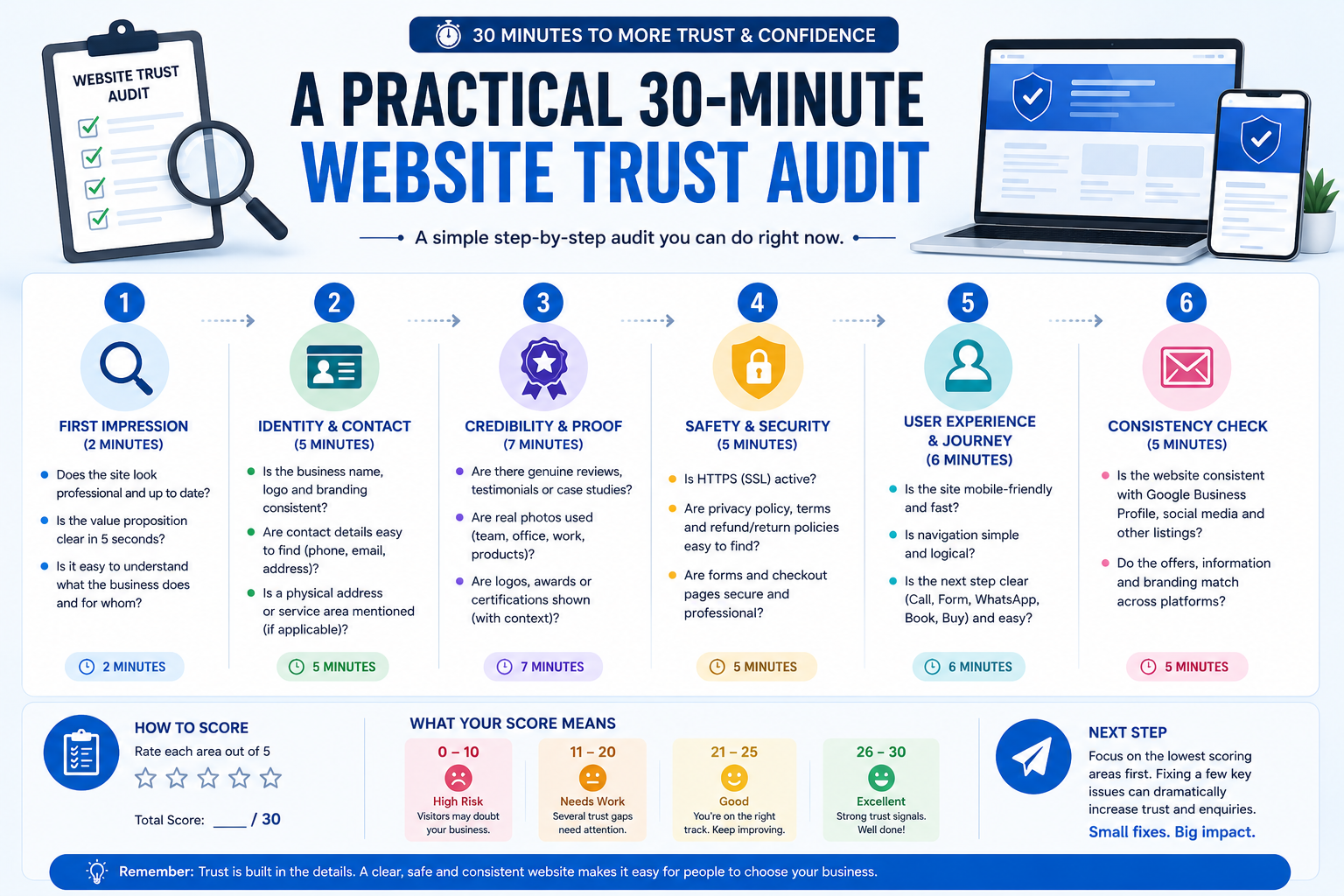
Prioritise the three issues most likely to create doubt at the moment of action. Fix those before changing decorative colours, animations or illustrations.
Does your website need a few fixes — or a complete rebuild?
Don’t replace a website just because it looks old. First identify whether the real problem is trust, messaging, UX, conversion flow or the underlying platform.
Common trust mistakes to avoid
- inventing a local office to appear closer to overseas customers;
- using fake countdown timers or manufactured scarcity;
- publishing fabricated or AI-generated testimonials;
- displaying credentials, client logos or trust marks without permission;
- claiming guaranteed results;
- hiding fees until checkout;
- copying another company’s policies;
- collecting more form data than the enquiry needs;
- using stock photos as if they show real staff or work;
- assuming a redesign alone will repair inconsistent business information.
Should you patch, redesign or rebuild the website?
Patch the current site when the platform is stable, the structure still fits the business, and the main problems are missing proof, unclear copy, stale information, broken links or neglected forms.
Consider a strategic redesign when trust breaks appear across navigation, mobile UX, service structure, visual hierarchy, evidence placement and conversion paths.
Consider a rebuild when the platform is insecure, unsupported, extremely difficult to maintain, or unable to support essential booking, ecommerce, multilingual, membership or integration requirements.
The decision should follow evidence rather than embarrassment about an older design. Use the website redesign vs rebuild guide to evaluate the wider technical and strategic decision.
Does Your Website Reflect the Quality of Your Business?
If your business is credible but the website is not producing the same confidence, I can review the identity, evidence, mobile experience and enquiry journey to identify the highest-priority trust breaks.
Request a website trust and conversion review
How trust-focused content supports AI visibility
There is no special “AI trust score” to add to a website. Google says the same foundational practices used for Search apply to its AI features, including helpful, reliable, people-first content. Its current guidance also encourages clear authorship and non-commodity, expert-led information.
For a small business, that means publishing material that another source can verify and quote:
- a clear author and relevant experience;
- specific explanations rather than generic advice;
- first-hand observations labelled as experience;
- factual claims linked to reliable sources;
- original frameworks presented as frameworks, not certifications;
- visible review dates and updates;
- consistent business information across the site.
AI visibility cannot be guaranteed, but clear entities, attributable expertise and independently checkable facts give search and answer systems better material to understand.
Frequently asked questions
Do small businesses still need a website if they have a Google Business Profile?
A Google Business Profile is valuable for discovery, location information and reviews, but a website gives the business control over its service details, proof, policies, customer journey and brand story. For high-value or unfamiliar decisions, customers may use both to verify the company.
What is the fastest way to make a website look more legitimate?
Start with alignment. Use a matching business name, domain and email; publish accurate contact and location or service-area information; identify the people behind the company; add real work or product evidence; and explain what happens after the customer contacts, books or buys. Then repair broken mobile actions and outdated information.
Do trust badges increase conversions?
A recognised, verifiable trust mark may reduce doubt in the right context, but no badge can compensate for unclear identity, weak policies, insecure handling or a broken checkout. False, irrelevant or unverifiable badges can damage trust. Evaluate the underlying verification and customer need before adding one.
How many reviews should a website show?
There is no universal number. Show enough recent, relevant and authentic reviews to help a buyer evaluate the specific service or product. Specificity, attribution and independent verification matter more than a large anonymous count.
Should a service business publish prices?
Publish fixed prices when the scope is standard. For bespoke work, explain starting points, typical scope factors or the information required for an accurate quote. The goal is to reduce uncertainty without promising an inaccurate figure.
How often should a small-business website be checked?
Test primary forms, booking routes, phone links and checkout after significant updates and on a regular maintenance schedule. Review contact details, staff, services, offers and policies whenever the business changes. The right frequency depends on transaction volume and risk; a busy ecommerce store requires more active monitoring than a simple brochure site.
Final takeaway
Website trust is not created by repeatedly saying “trusted.” It is created when identity, relevance, evidence, safety and continuity align.
In a market filled with polished templates and automated content, specific human and operational detail is an advantage. Make the business easy to verify, make the offer easy to understand, support important claims, protect the customer journey and keep every step consistent.
If your site looks professional but still generates weak enquiries or hesitation, diagnose the earliest trust break before buying more traffic or commissioning a complete redesign.
Your website should make choosing your business feel easier — not riskier.
If your business is established but your website isn’t generating the confidence, enquiries or opportunities it should, I’ll help identify what’s creating hesitation and what should be fixed first.
Sources and methodology
- Google Search Central: Creating helpful, reliable, people-first content
- Google Search Central: Guide to optimizing for generative AI features
- Google Search Central: Understanding page experience
- UK Government: UK Business Data Survey 2026
- Pantheon: June 2026 US consumer website-trust survey
- auDA: Digital Lives of Australians 2026 small-business findings
- US Federal Trade Commission: Online shopping guidance