Quick Answer
Effective wellness clinic website design starts by organizing treatments around the way clients understand their needs, not the way the business organizes its internal services. A clinic offering massage, skincare, body therapies, nutritional consultations, and specialist treatments needs clear categories, intuitive navigation, and dedicated service pages. The goal is to help visitors find relevant treatments, understand their options, and book without unnecessary confusion.
TL;DR: Key Takeaways
- Group related treatments into clear categories instead of listing every service in the main menu.
- Use familiar treatment names rather than internal department terminology.
- Give important treatments dedicated pages with suitability information, pricing where appropriate, and clear booking options.
- Keep navigation usable on mobile devices, where crowded menus can become especially difficult to navigate.
- Test whether visitors can find treatments and complete booking journeys rather than judging navigation by appearance alone.
- Measure qualified inquiries and booking completion to understand whether structural changes improve the customer journey.
What Does Real Usability Research Reveal About Website Navigation?
Good website navigation helps visitors find the information they need without having to understand the organization’s internal structure. This is especially relevant to multi-service wellness businesses because visitors may arrive looking for a specific treatment, comparing alternatives, checking prices, or trying to determine which service suits their needs.
NHS England’s research-based guidance on GP websites includes testing with 102 patients and research involving 165 general practice staff across 25 practices. It recommends prioritizing important tasks, using familiar language, simplifying navigation, and testing websites with actual users. Its findings relate to healthcare websites rather than commercial wellness clinics, but the underlying principles apply to service discovery and appointment journeys. Read the NHS England guidance.
The U.S. Department of Health and Human Services also recommends organizing and labeling website content according to users’ needs, using familiar terms, and testing the structure with users. Read Health Literacy Online’s navigation guidance.
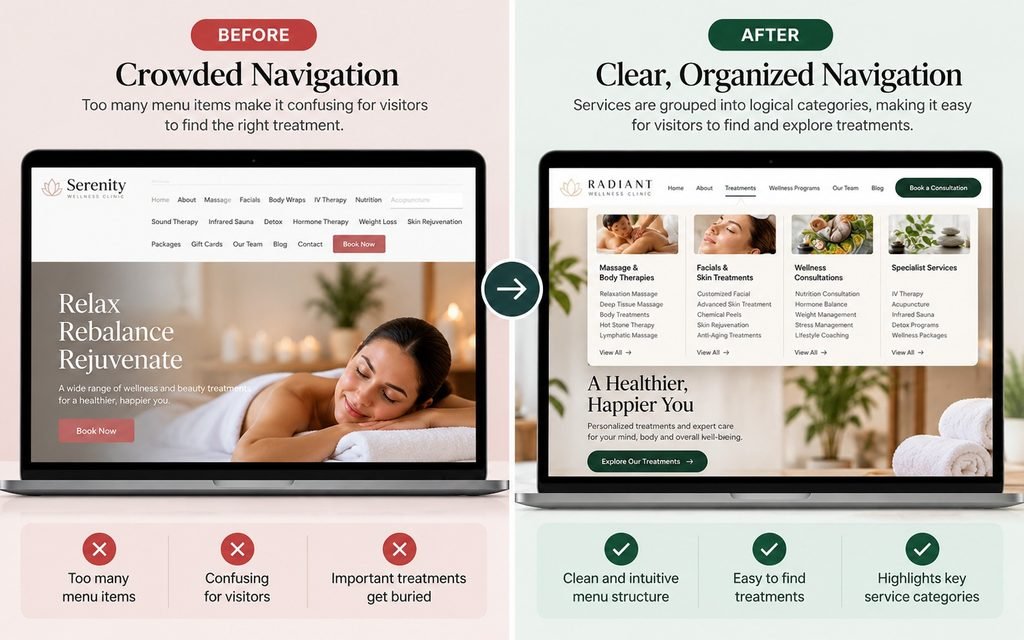
If Visitors Can’t Find a Treatment, They May Never Book It.
A multi-service wellness website should help visitors explore treatments without navigating a long, confusing list. Clear service categories make it easier to discover the right information.
Everything Under One Menu
A long list of individual services can become difficult to scan, especially on mobile.
Services Grouped by Need
Meaningful categories help visitors understand your services before exploring individual treatments.
| Navigation decision | Recommended approach | Business benefit |
|---|---|---|
| Main menu | Use a small set of meaningful destinations. | Helps visitors choose a route without scanning an overwhelming list. |
| Treatment categories | Group related services logically. | Makes the treatment catalog easier to understand. |
| Individual treatment pages | Explain the service, suitability, and next steps. | Helps prospective clients evaluate their options. |
| Mobile menu | Use clear labels and accessible controls. | Reduces friction on smaller screens. |
| Booking pathway | Connect each treatment to a relevant booking action. | Helps interested visitors move toward an appointment. |
| Performance measurement | Track treatment discovery and booking completion. | Reveals where users struggle or abandon the journey. |
These are evidence-informed usability recommendations, not guaranteed conversion improvements. A clinic should validate their commercial effect using its own analytics, booking data, and user testing.
Why Does a Multi-Service Wellness Website Need a Different Navigation Strategy?
A multi-service wellness clinic website needs a website structure that reflects how prospective clients search for and evaluate treatments. The clinic may organize its business around practitioners, departments, equipment, or internal workflows, but visitors usually arrive with a specific need or question.
For example, a clinic offering massage, facials, body treatments, nutritional consultations, and specialist therapies should not automatically place every service in the main menu. As the catalog grows, the header can become crowded, treatment names can compete for attention, and visitors can struggle to distinguish between related options.
The commercial risk is straightforward: a visitor may be interested in a treatment but fail to find the relevant information quickly enough to continue. The solution is not necessarily to remove services. It is to create a hierarchy that makes the complete offering accessible without presenting everything at once.
What should appear in the main navigation?
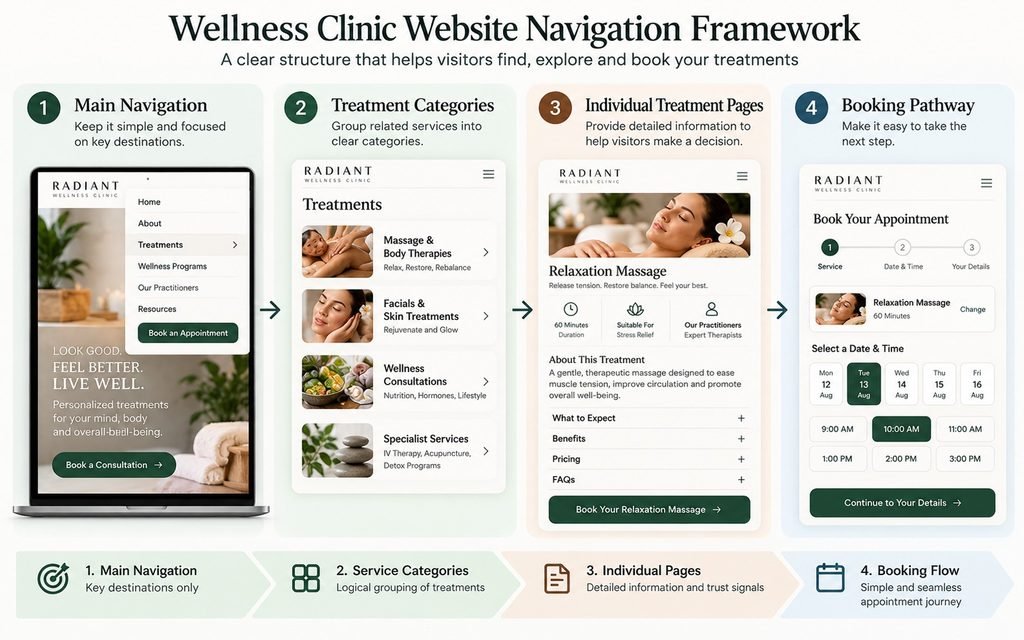
The main menu should expose the most important destinations without attempting to display the entire treatment catalog. A practical starting point is:
- Treatments
- Wellness Programs, if applicable
- Our Practitioners
- About
- Resources or FAQs
- Book an Appointment
This structure should reflect the clinic’s actual services and visitor priorities. A practice built around practitioner consultations may need a different hierarchy from a wellness center that primarily sells treatment packages.
Industry observation 1: Clinics frequently think about navigation in terms of what the business offers, while visitors think about what they want to find. The best menu reconciles those two perspectives rather than forcing visitors to learn the clinic’s internal terminology.
How should treatments be grouped?
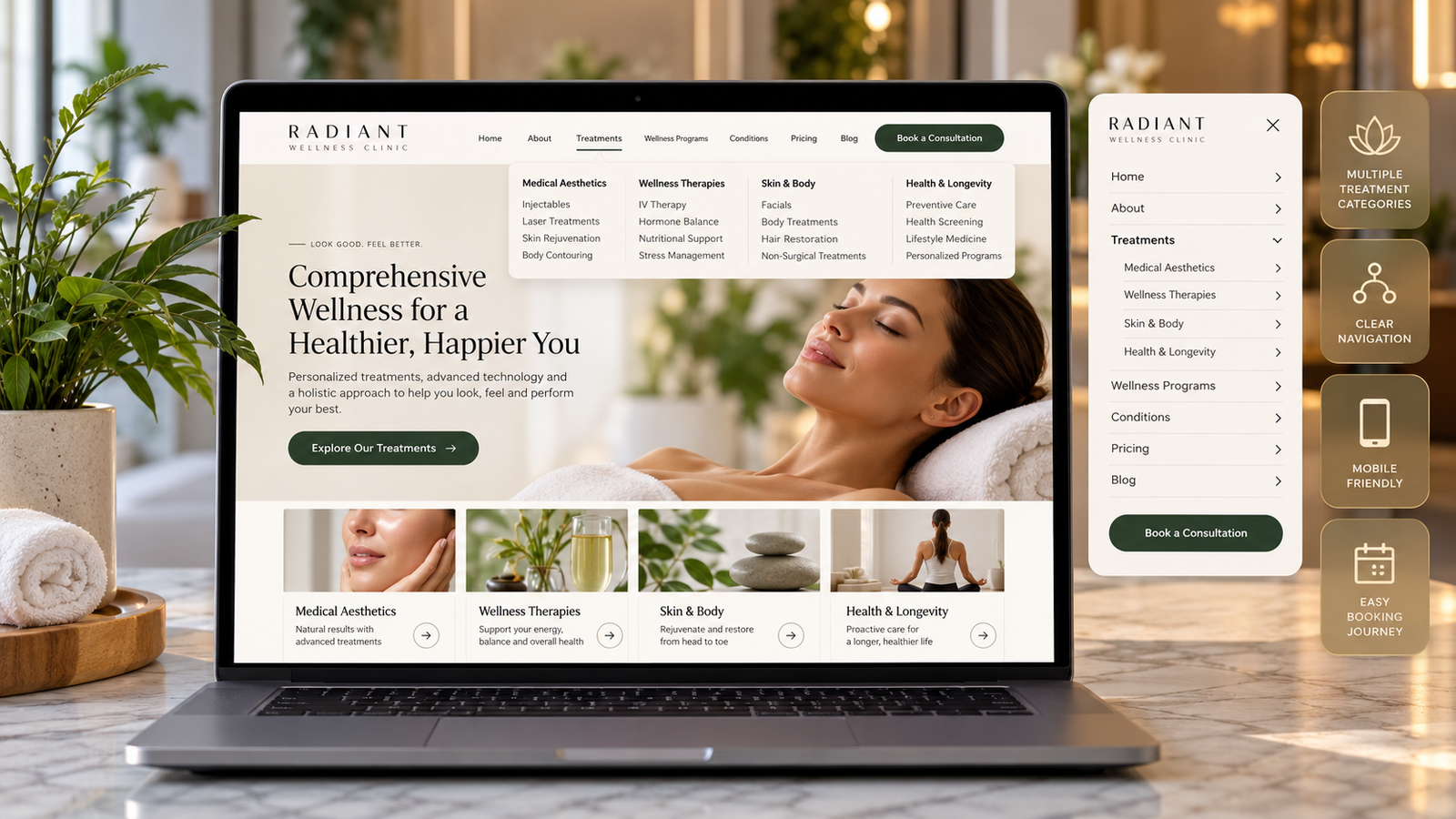
A wellness center website navigation strategy should organize services into categories that visitors can understand without additional explanation. Depending on the clinic’s actual offering, these categories might include massage and body therapies, facial and skin treatments, wellness consultations, and specialist services.
Avoid creating a separate category for every treatment. Instead, group services according to meaningful relationships and provide category pages that introduce the available options.
A useful test is whether a first-time visitor can predict which category contains a particular treatment. If the answer is unclear, the label or grouping may need to change.
How Should You Structure Treatment Pages Without Creating an Endless Menu?
A clear treatment hierarchy separates the main navigation from the detailed pages that explain individual services. The main menu introduces major categories, category pages help visitors compare related treatments, and individual treatment pages answer the questions that matter before booking.
Consider a clinic with 20 treatments across four categories. Instead of listing all 20 services in the header, it could use four clear categories, with individual treatment pages linked from the relevant category.
A simplified hierarchy might look like this:
- Treatments
- Massage and Body Therapies
- Relaxation Massage
- Deep Tissue Massage
- Body Treatments
- Facial and Skin Treatments
- Customized Facial
- Advanced Skin Treatment
- Wellness Consultations
- Nutrition Consultation
- Personalized Wellness Plan
- Specialist Services
- Relevant specialist treatments
- Massage and Body Therapies
The actual hierarchy must reflect the clinic’s services. It should also avoid unnecessary clicks that force visitors through several generic pages before reaching the information they need.
What should every important treatment page include?
Each important treatment page should help visitors understand the service, determine whether it may suit their needs, and identify the next step.
- Treatment purpose: Explain what the service involves and what it is intended to address.
- Suitability: Describe who the treatment may be appropriate for and when professional advice is needed.
- What to expect: Explain the process, duration, preparation, and aftercare where relevant.
- Practitioner information: Introduce the professional delivering the service and relevant credentials.
- Pricing: Show the price or explain how it is determined, where appropriate.
- Frequently asked questions: Answer common concerns without making unsupported health claims.
- Booking action: Provide a clear route to book, inquire, or request a consultation.
Industry observation 2: A visitor may find a treatment page but still be unable to distinguish it from two similar services. Category pages should explain the available choices, while individual pages should clarify the differences that matter to the decision.
Why Can a Beautiful Wellness Website Still Lose Potential Bookings?
A visually attractive website can still create friction when navigation, treatment descriptions, or booking pathways do not answer visitors’ questions. A premium appearance may create a positive first impression, but it cannot compensate for an unclear service structure.
This problem becomes more noticeable when several treatments have overlapping benefits or similar names. If visitors cannot distinguish between options, they may postpone their decision or contact reception for information the website could have provided.
For a related perspective, read our analysis of why beautiful clinic websites still fail to generate consultations. It examines how presentation, trust, and the consultation journey interact.
What navigation mistakes should wellness clinics avoid?
Avoid these common mistakes:
- Listing every treatment directly in the main menu.
- Using vague labels such as “Our Solutions” when visitors expect recognizable treatment names.
- Grouping unrelated services under broad categories that hide important distinctions.
- Creating several navigation levels when a simple category page would work.
- Sending every treatment button to the same generic booking page without preserving treatment context.
- Hiding essential service information or pricing when it is appropriate to disclose it.
- Relying on icons, color, or imagery without clear text labels.
Industry observation 3: When a clinic introduces a new treatment, adding another item to the main menu may seem like the easiest update. Over time, however, these small decisions can turn a clear service hierarchy into a collection of disconnected links. New services should be added to an existing category where appropriate, with new categories created only when the distinction is useful to visitors.
The financial effect should be evaluated rather than assumed. Review whether visitors find the relevant treatment, whether they progress to booking, and whether reception continues to receive repeated questions about information the website should explain.
Your Clients Know What They Want to Feel. Do They Know Which Treatment to Choose?
Many visitors begin with a goal rather than a specific treatment name. A thoughtful website structure helps them move from their needs to relevant services and an appropriate next step.
Start With a Goal
Relaxation, skin care, movement or general wellbeing.
Browse Service Groups
Present meaningful treatment categories with clear descriptions.
Understand Options
Explain duration, suitability, expectations and relevant details.
Book or Enquire
Provide a clear booking route or consultation option where appropriate.
Create a service discovery experience that makes your full range of treatments easier to understand.
Improve My Service Journey →How Can a Clinic Test Whether Its Navigation Actually Works?
A navigation structure should be tested against real visitor tasks rather than approved simply because the clinic owner understands it. The most useful test is whether someone unfamiliar with the business can find a treatment, understand the relevant information, and identify the next step.
Create five to seven realistic tasks, such as finding a particular facial, comparing two massage options, checking treatment prices, identifying a practitioner, and booking an appointment. Ask representative users to complete these tasks on desktop and mobile devices.
Record where participants hesitate, which labels they misunderstand, and whether they reach the correct destination. If several people interpret a category differently from the way the clinic intended, the label or grouping may need to change.
Useful measures include:
- Time required to find a specified treatment.
- Successful completion of treatment-finding tasks.
- Clicks required to reach a relevant booking route.
- Treatment-page exits and booking-button interactions.
- Booking completion rates where reliable tracking is available.
- Common questions received by reception or the front desk.
Fewer clicks do not automatically mean better usability. A category page may add one step while helping visitors make a more informed choice. Measure whether the structure supports the intended task, not just how quickly someone moves through the website.
Example Scenario
Consider a hypothetical wellness clinic offering 20 treatments across massage, skincare, body therapies, and consultations. Its original menu lists every service separately, forcing visitors to scan a long list before locating the treatment they want.
The wellness clinic website reorganizes the menu around four clear categories, creates individual treatment pages, and places relevant booking actions on those pages. It then tests common visitor tasks and compares the results with its original navigation.
The expected benefit is a clearer path from treatment discovery to booking, but the clinic must measure actual task completion and appointment data to establish whether performance improves. This is an illustrative scenario, not a documented KG Web Designer client result.
Example From Our Experience: What Should a Navigation Audit Examine?
A useful navigation audit examines the relationship between the service catalog, navigation labels, treatment-page content, and booking pathway. It should distinguish observable problems from hypotheses about their commercial effects.
At KG Web Designer, the practical approach is to map the existing pages, identify overlapping categories, review important visitor tasks, and establish whether the structure supports the clinic’s business priorities. One issue worth investigating is a mismatch between internal service terminology and the words prospective clients are likely to recognize.
Problem: Visitors have difficulty distinguishing services or locating the right treatment page.
Solution: Simplify the main menu, create logical categories, improve treatment descriptions, and connect important pages to relevant next steps.
Outcome to measure: Treatment-finding success, booking-path completion, and the relevance of resulting inquiries.
This is a diagnostic framework, not a claim of a measured result from an unnamed client. A genuine case study should document the actual project, work completed, and verified outcome rather than assigning an invented percentage improvement.
How Many of Your Treatments Are Difficult to Find on Your Website?
A clear website structure should help visitors discover services without searching through multiple pages or confusing menus.
Are treatments grouped under labels that visitors understand?
Can visitors find less-promoted treatments without excessive searching?
Do individual service pages explain benefits, expectations and booking information?
Can mobile visitors explore treatment categories comfortably?
Do related services and packages connect logically?
Is the next step easy to find on every important treatment page?
Your website should help visitors understand your full service offering, not just your most popular treatments.
Request a Navigation Review →What Should You Fix First, Second, and Third?
The most efficient improvement plan begins with information architecture, then addresses treatment content, and finally refines visual design and tracking. This sequence prevents a clinic from investing in a polished interface before resolving the structure that visitors must use.
First: Audit the treatment catalog. List every treatment, package, consultation, and program. Identify duplicates, overlapping services, and categories that make sense internally but may confuse prospective clients.
Second: Rebuild the hierarchy and page relationships. Establish a focused main menu, clear category pages, and direct links between related treatments. Ensure every important service has enough information and a relevant next step.
Third: Test and measure. Review the updated website on mobile and desktop, test common visitor tasks, check links, and measure booking behavior. Use the findings to refine labels and page relationships rather than assuming the first version is perfect.
This approach is especially useful when the clinic is expanding its services. A well-planned structure can accommodate new treatments without repeatedly rebuilding the entire menu.
For clinics that promote several services through search, paid campaigns, and other channels, website categories should also align with the visitor’s original intent. Our guide to med spa marketing strategy provides further context on coordinating service promotion with the clinic’s wider marketing efforts.
Is Your Treatment Menu Making Services Hard to Find?
If your clinic has expanded its treatment list but the website has become harder to navigate, a focused website review can identify where the service hierarchy, page structure, and booking pathways need attention.
KG Web Designer can assess whether your existing website needs targeted navigation improvements or a broader redesign. The recommendation should depend on the site’s current structure, technical condition, content, and business goals, not an automatic assumption that a new website is necessary.
How Should Treatment Content Support Navigation and Conversions?
Clear navigation helps visitors reach the right page, but the treatment content must help them make an informed decision once they arrive. A category page should introduce the available options, explain the distinctions between them, and direct visitors to relevant treatment details.
Our guide to aesthetic clinic website design and presenting services to increase consultation requests explains how service presentation can support a more informed consultation journey. Although aesthetic clinics differ from broader wellness practices, the principle is relevant: visitors need understandable information before they are ready to take the next step.
Pricing also influences how visitors evaluate their options. The appropriate level of transparency depends on the service, pricing model, and clinic’s professional obligations. For a related perspective, see whether aesthetic clinics should display treatment prices online.
Expert Insight from Kanika Gupta
Kanika Gupta, Founder, KG Web Designer
My view is that the main navigation should not be a complete inventory of everything a clinic sells. It should be a map of the decisions visitors need to make.
If this were my website, I would ask someone unfamiliar with the clinic to find three treatments without assistance. I would watch where they hesitate, which labels they misunderstand, and whether they can identify the next step. That observation would be more useful than debating menu labels in a meeting without testing them.
I would also resist the temptation to give every new service a prominent place in the header. New treatments should be added where they belong in the existing structure. The main menu should change only when visitor needs or business priorities justify it.
What This Means For Your Business
A well-structured wellness clinic website design makes a broad service offering easier to understand and navigate. It can help visitors identify relevant treatments, compare options, and reach booking pathways without unnecessary confusion.
For the business, that means addressing avoidable obstacles between discovering a service and taking action. It may also make routine treatment information easier for staff to find online, although any reduction in calls or increase in bookings should be verified with actual operational data.
The long-term advantage is a service structure that can grow with the clinic. When new treatments fit into a clear hierarchy, the website can expand without forcing visitors to relearn how everything is organized.
Final Thoughts
A multi-service wellness clinic website should organize its website around the way visitors find, compare, and choose treatments. A focused main menu, meaningful service categories, useful treatment pages, and clear booking pathways make a large service offering easier to navigate.
If I were prioritizing the investment, I would audit the treatment catalog first, simplify the navigation second, and test the complete visitor journey third. That sequence creates a practical basis for improving usability before committing to a larger redesign.
If your clinic’s growing treatment list has made the website harder to navigate, KG Web Designer can help assess your information architecture, treatment pages, and booking pathways.
Discuss your wellness clinic website project with KG Web Designer.
Are Your Website Visitors Discovering All the Treatments You Offer?
Let’s review how your website organises treatments, guides visitors through different services and supports appointment enquiries. We’ll identify practical opportunities to improve navigation, service visibility and the booking experience.
What We’ll Review
Website Strategist
Frequently Asked Questions
How many items should a wellness clinic have in its main navigation menu?
There is no universal number that works for every clinic. A smaller practice may need only a few top-level destinations, while a larger multi-service clinic may require additional categories. Start with the most important visitor tasks, group related treatments, and test whether people can find what they need without confusion.
Should every wellness treatment have its own website page?
Every important treatment should have a dedicated page when visitors need distinct information to understand, compare, or book it. Closely related services may be explained together when their differences are minor, but separate pages are useful when purpose, suitability, process, pricing, or booking requirements differ substantially.
How do I organize a wellness website with many different treatments?
Begin by creating a complete list of services and grouping them according to meaningful relationships, such as treatment type or visitor needs. Use a small number of clear top-level categories, provide category pages that introduce related options, and connect each treatment page to a relevant next step.
Does website navigation affect wellness clinic bookings?
Navigation can influence how easily visitors reach treatment information and booking options, but it does not independently determine conversion rates. Booking performance also depends on service relevance, trust, pricing, availability, mobile usability, and the booking process. Measure task completion and booking data before attributing changes to navigation alone.
Should wellness clinic website navigation be different on mobile?
Mobile navigation should make important destinations easy to locate and use on smaller screens. Test readable labels, touch targets, menu behavior, and booking actions on actual mobile devices. Avoid relying entirely on unfamiliar icons or interactions that hide essential destinations from visitors.
Should a wellness clinic use one general booking button or separate buttons for each treatment?
A general booking button can work for clinics where staff help clients select a service, while treatment-specific buttons are useful when visitors already know what they want. Where possible, preserve the selected treatment as visitors enter the booking process so they do not need to repeat information or restart their search.
How can I tell whether my wellness clinic website needs a redesign?
Start by evaluating the existing navigation, service pages, mobile experience, technical performance, and booking journey. If the current platform can support a clearer structure, targeted improvements may be sufficient. A broader redesign is more appropriate when the underlying architecture or technology prevents the clinic from meeting its current business needs.