Quick Answer
Wholesale buyers need more than a product catalog and a password-protected account. The most valuable b2b ecommerce website features help approved customers access negotiated prices, compare volume discounts, find products by SKU, place bulk orders, manage company purchasing, and retrieve invoices. The right feature set depends on your customers’ buying habits, pricing agreements, order approval process, and existing business systems.
TL;DR: Key Takeaways
- Wholesale buyers need access to the correct products, prices, and purchasing permissions for their company.
- Pricing tiers should explain unit prices, minimum quantities, and discount thresholds before checkout.
- SKU search, bulk ordering, and reorder tools make recurring purchases easier to manage.
- Company accounts may require multiple users, role-based permissions, and purchasing approvals.
- Invoices, order history, payment terms, and saved addresses support post-purchase account management.
- The right platform should match the business’s commercial workflow without introducing unnecessary complexity.
What Do Wholesale Buyers Actually Check Before Placing an Order?
Wholesale buyers typically check whether they can access their account, confirm their negotiated prices, locate the correct products, and complete an order according to their company’s purchasing rules. When any of these steps is unclear, buyers may return to email and manual ordering, increasing friction for both customers and sales teams.
Retail and wholesale buying journeys are different. A retail customer may compare several products before buying one item, while a purchasing manager may need to source dozens of SKUs, verify case quantities, obtain approval, and retrieve an invoice for accounting.
The website should reflect these operational differences rather than simply display a retail storefront behind a login screen.
| Wholesale buyer task | Website capability | Business value |
|---|---|---|
| Access approved prices | Company login and assigned catalog | Reduces pricing confusion |
| Compare quantities | Volume pricing and quantity rules | Makes order costs easier to evaluate |
| Locate known products | SKU search and technical filters | Helps buyers find the correct items |
| Place large orders | Quick order and bulk entry | Reduces repetitive data entry |
| Coordinate purchasing | Buyer roles and approval workflows | Supports internal purchasing controls |
| Repeat an order | Order history and saved lists | Simplifies recurring purchases |
| Manage transactions | Invoice access and payment information | Supports account administration |
Shopify documents company accounts, catalogs, volume pricing, and quantity rules. BigCommerce B2B Edition documents capabilities such as company management, buyer permissions, bulk ordering, and invoice tools. Availability depends on the platform, plan, configuration, and integrations. Sources: Shopify B2B features and BigCommerce B2B Edition.
Can Your Wholesale Buyers Do More Than Just Log In?
A customer account should make purchasing easier. Check whether your ecommerce website supports the features business buyers actually need.
Do approved buyers see the correct contracted or customer-group prices?
Can customers understand quantity breaks and applicable discounts?
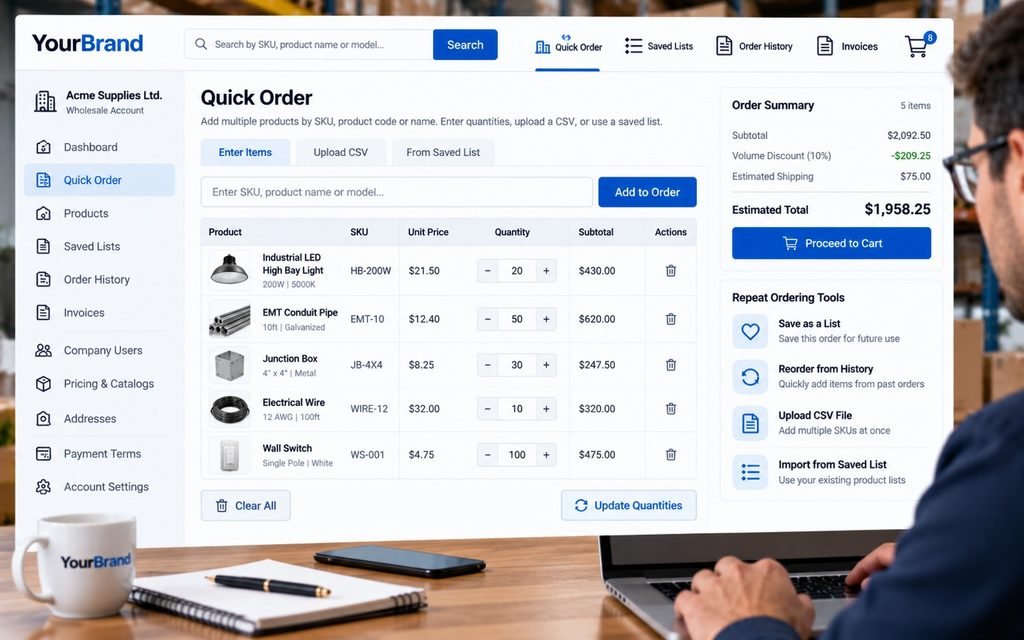
Can buyers order multiple SKUs and quantities without unnecessary steps?
Is relevant inventory or lead-time information clear before ordering?
Can returning customers quickly reorder previously purchased products?
Can buyers access order history, invoices and relevant account information?
If your wholesale website works like a retail store with a login screen, it may be missing important B2B purchasing functionality.
Explore B2B Ecommerce Design →Why Does a Wholesale Store Need More Than a Standard Customer Login?
A wholesale account should do more than verify a customer’s identity. It should connect the buyer to the correct company, catalog, pricing rules, purchasing permissions, and order information.
A generic account may work for a small store with one standard price list. It becomes restrictive when distributors, resellers, contractors, and larger purchasing organizations have different commercial agreements.
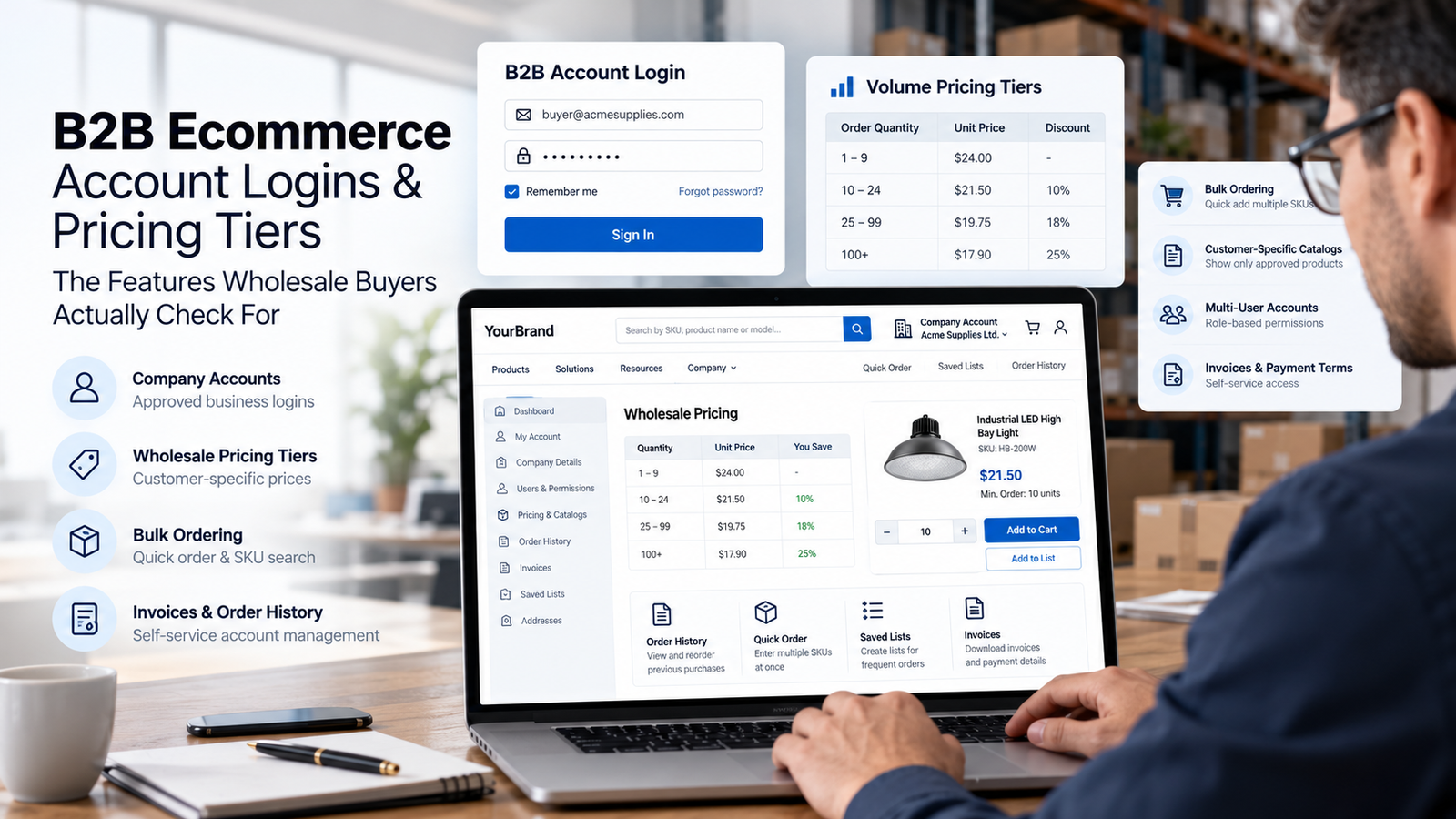
A well-planned b2b ecommerce account login experience should support these requirements:
- Account approval: Business applicants can submit the details needed for wholesale verification.
- Customer-specific access: Approved buyers see the products and prices assigned to their company.
- Multiple users: Company administrators can manage authorized purchasing contacts where supported.
- Role-based permissions: Some users can prepare an order while authorized colleagues approve or submit it.
- Account self-service: Buyers can access permitted order history, shipping information, and account details.
- Secure account recovery: Login recovery should be clear without exposing confidential company information.
The right setup depends on the customer base. A small reseller may need one approved account and a negotiated catalog, while a large distributor may need multiple locations, separate buyer roles, and shared purchasing visibility.
At KG Web Designer, we treat account functionality as part of the buying journey rather than an isolated login page. The key question is whether an approved customer can complete routine purchasing tasks without unnecessary assistance from your sales team.
How Should Wholesale Pricing Tiers Work on a Website?
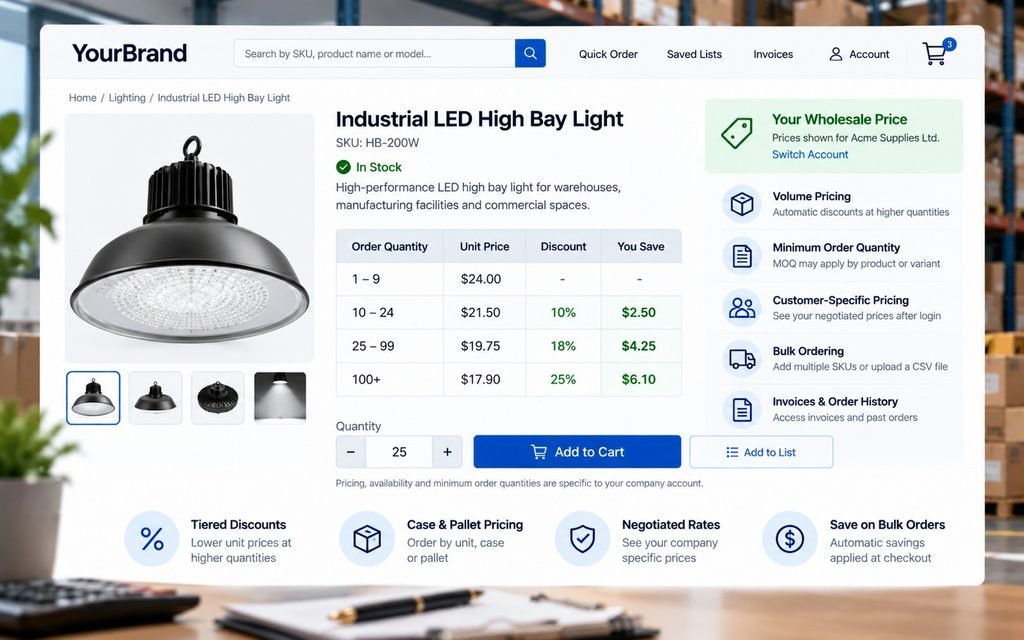
Wholesale pricing should make the applicable unit price, minimum order quantity, and volume thresholds easy to understand before a buyer commits to an order. Pricing must remain consistent across the product page, cart, and checkout.
Shopify’s B2B documentation describes catalogs, quantity rules, and volume price breaks. Its April 2026 plan documentation also distinguishes foundational B2B capabilities from advanced features, including direct assignment of catalogs to individual companies and company locations, which remains a Shopify Plus capability. Businesses should verify current plan limitations before selecting a platform. Sources: Shopify catalogs and Shopify B2B plan features.
A well-designed wholesale pricing tiers website experience should answer the following questions:
- What price applies to my company?
- Is there a minimum order quantity?
- When does the unit price change?
- Are products sold individually, by case, carton, or pallet?
- Does the discount apply to each SKU or the entire order?
- Do negotiated prices override standard volume discounts?
- Are shipping and other charges calculated separately?
Consider this illustrative pricing structure:
| Order quantity | Unit price | Explanation |
|---|---|---|
| 1–9 units | $24.00 | Standard account price |
| 10–24 units | $21.50 | Volume price begins at 10 units |
| 25+ units | $19.75 | Higher-volume price begins at 25 units |
These figures are illustrative only. They are not market data or recommended discount levels.
The storefront should display the actual rules configured by the business. If customers have negotiated agreements, the website must prevent unauthorized visitors from accessing confidential prices.
What Pricing Mistakes Can Cost a Wholesale Business?
Pricing errors can create more than a poor user experience. They can lead to abandoned orders, incorrect expectations, avoidable support requests, and manual order corrections.
Before launch, test representative accounts at quantities just below, exactly at, and above each price threshold. Include customer-specific discounts, minimum quantities, unavailable products, and product variants.
The objective is not simply to display a discount attractively. It is to make the correct price understandable to the buyer and accurate throughout the purchasing process.
Which Features Make Repeat Wholesale Orders Easier?
The most useful b2b ecommerce website features for repeat buyers reduce the work required to find known products, enter quantities, and reuse previous purchasing information. These tools are particularly valuable when customers regularly buy parts, supplies, or replenishment products.
1. SKU and product-code search
Wholesale buyers often arrive with a product code from a spreadsheet, catalog, or previous invoice. Search should support exact SKUs and relevant model numbers, with useful results for recognized product names and identifiers.
Baymard Institute’s 2026 ecommerce search research reports that 56% of its benchmarked sites and apps fail to adequately support users’ search needs. This is general ecommerce research, not a B2B-only statistic, but it reinforces the importance of reliable product discovery. Source: Baymard ecommerce search research.
2. Quick order and bulk entry
A quick-order form lets buyers enter product codes and quantities in a structured list. CSV uploads may be useful for large orders, provided the system validates product codes, quantities, and availability before adding items to the cart.
3. Order history and reordering
Buyers should be able to locate previous purchases and repeat an order when the products remain available. If an item has been discontinued or its quantity rules have changed, the website should explain the issue rather than silently recreating an invalid order.
4. Saved lists and purchasing templates
Some organizations reorder by project, location, department, or recurring schedule. Saved lists can reduce repetitive work when account permissions are configured correctly and pricing remains current.
5. Useful filters and product specifications
Filters should reflect how buyers select products, including dimensions, materials, compatibility, model, pack size, or industry application. These tools become especially important when product names alone do not provide enough information for an accurate purchasing decision.
For a broader comparison of ecommerce platform and design choices, read our guide to custom ecommerce website design versus Shopify templates. The right decision depends on required workflows, integration needs, and future operating complexity rather than a blanket preference for custom development.
How Should Company Accounts Handle Multiple Buyers and Approvals?
Company accounts should reflect how business purchasing decisions are made. The employee selecting products may not be the person authorized to approve an order, manage company details, or handle invoices.
A smaller wholesale customer may need one buyer account, while a larger organization may require administrators, purchasing staff, finance contacts, and location-specific permissions.
Before implementation, define:
- Who can apply for a wholesale account.
- Who approves account applications.
- Which users can access company-specific prices.
- Who can prepare, approve, and submit orders.
- Who can view invoices and payment status.
- Whether buyers can purchase for multiple locations.
- Which account changes require administrator approval.
BigCommerce documents buyer roles, permissions, company account hierarchies, and shopping-list approval workflows. These capabilities can support complex purchasing structures, but the business should verify the exact configuration and availability required for its setup. Sources: BigCommerce B2B Edition and BigCommerce support.
The important planning step is to agree on the business rules before building the interface. If sales, finance, and operations use different definitions of an approved buyer or negotiated price, the website may reproduce those inconsistencies instead of solving them.
Your Buyers Shouldn’t Have to Email Sales to Find Their Own Pricing.
A well-designed B2B account experience can help eligible buyers view their applicable pricing, understand volume discounts and place orders with greater confidence.
Illustrative pricing interface only. Actual prices and tier rules depend on each business.
Your B2B ecommerce website should reflect real commercial relationships, not force every customer through the same retail pricing experience.
Discuss My Wholesale Portal →What Do Real B2B Ecommerce Website Examples Reveal?
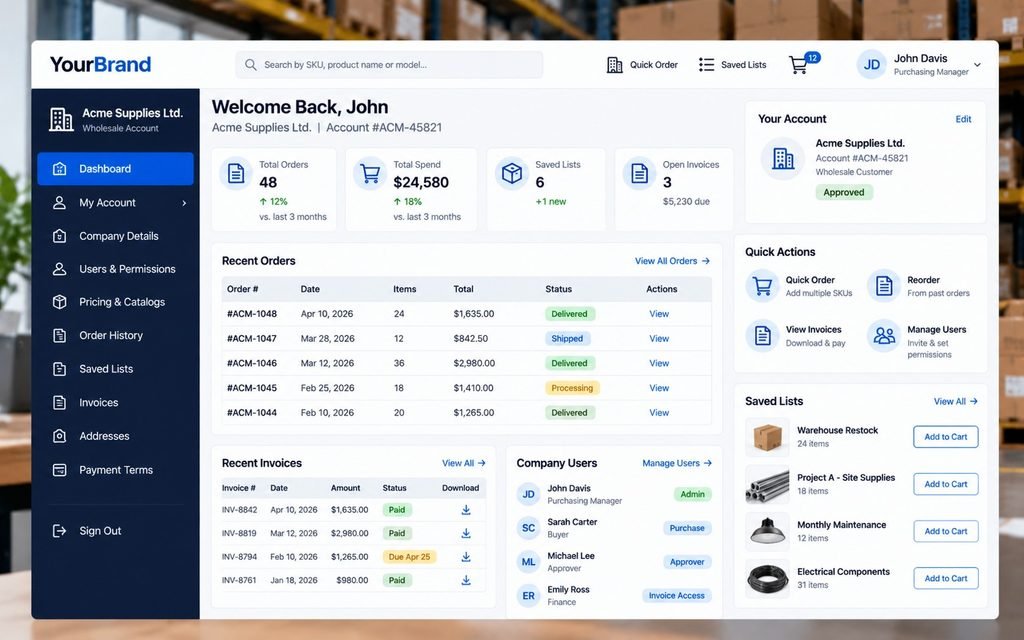
Documented platform capabilities show that modern B2B commerce can support more than account login and product display. It can include customer-specific catalogs, bulk ordering, buyer permissions, and account administration, although the available functions differ by platform and plan.
| Platform | Documented capabilities | What to verify |
|---|---|---|
| Shopify B2B | Company accounts, catalogs, quantity rules, volume pricing, and payment terms | Catalog limits, company-specific assignments, and advanced workflow requirements |
| BigCommerce B2B Edition | Company accounts, buyer roles, bulk ordering, shopping-list approvals, and invoice tools | Configuration, integrations, and account workflow support |
Sources: Shopify B2B features and BigCommerce B2B Edition.
Businesses reviewing b2b ecommerce website examples should inspect the signed-in buyer experience, not just the public homepage. Check whether an approved customer can find a product, see the correct price, place an order, and retrieve transaction details without unnecessary manual steps.
What Should You Evaluate Before Investing in New Features?
Start with the purchasing tasks your customers perform most often. Then compare the required experience with the platform’s documented capabilities, limitations, and integration requirements.
A useful feature comparison should go beyond a yes-or-no checklist. Confirm which plan or add-on is required, how customer data is maintained, and whether the feature works with existing inventory, accounting, and order-management systems.
This helps prevent two expensive mistakes: paying to recreate functionality the platform already supports, or choosing a platform that cannot support the commercial rules your business depends on.
What Should You Fix First, Second, and Third?
The most reliable implementation sequence is to confirm the commercial rules first, improve the core buying journey second, and optimize the experience after the complete workflow has been tested.
First: Document the business rules. Define account approval, pricing groups, minimum quantities, payment terms, order permissions, and company locations. Identify what the current platform supports and what requires configuration or integration.
Second: Make the core purchasing journey reliable. Test login, catalog visibility, SKU search, quantity entry, pricing calculations, cart, checkout, and order confirmation using representative account types.
Third: Improve repeat purchasing. Add reorder tools, saved lists, invoice access, and account self-service according to verified customer needs.
Fourth: Improve product discovery. Review category structure, filters, product specifications, mobile usability, and search behavior. Our guide to ecommerce category page optimization explains why product organization and navigation deserve attention alongside account functionality.
Fifth: Measure performance. Track account application completion, approved-account activation, search failures, order completion, repeat-order activity, and pricing-related support requests. Establish a baseline before attributing any improvement to the website.
This order reduces the risk of spending on visual changes while pricing rules, product data, or checkout still create obstacles.
Why Most Businesses Get This Wrong
Businesses often treat wholesale functionality as a collection of add-ons rather than a connected purchasing system. They may add a login, a discount tool, and a bulk-order form without checking whether these features use consistent account data, pricing rules, and permissions.
Common mistakes include:
- Hiding prices without explaining how wholesale customers qualify for access.
- Showing volume discounts without clarifying quantity thresholds.
- Relying on product-name search when buyers use SKUs and model numbers.
- Giving every company user identical purchasing permissions.
- Building custom features before checking the existing platform.
- Ignoring invoices, payment terms, and order administration after checkout.
- Failing to test the full process with realistic company accounts.
Checkout deserves particular attention because friction at the final step can undermine the work invested in product discovery and account access. Our guide to checkout page optimization explains why the final purchase steps should be evaluated as part of the wider buying journey.
Successful businesses define their purchasing process before choosing features. This makes the investment easier to scope, test, and maintain.
A B2B Login Should Make Every Repeat Order Easier Than the First.
Business customers often return to purchase familiar products. Your website should help them access their account, find the right items and reorder without rebuilding their cart from scratch.
Secure Account Login
Let approved buyers access the correct account information and permissions.
Relevant Product Catalogue
Show products, availability and pricing appropriate to the customer.
Efficient Bulk Checkout
Support quantity selection, multi-SKU orders and applicable purchasing terms.
One-Click Reorder Path
Help customers rebuild previous orders quickly, with current prices and availability confirmed.
A better wholesale buying experience can reduce manual purchasing friction and make repeat ordering more convenient.
Improve My B2B Ecommerce UX →Example Scenario
Consider a wholesale distributor whose regular customers email spreadsheets to sales representatives. Staff must confirm account prices, check quantities, and prepare orders manually, while customers wait for confirmation.
A practical improvement plan would begin by validating customer-specific pricing and SKU data. Next, the business could introduce approved accounts, product-code search, bulk order entry, and a clear order review process, then prioritize reordering and invoice access where supported.
The potential benefit is a more self-directed purchasing process and less repetitive administration. Actual savings and revenue changes must be measured after implementation; they should not be assumed from the feature list alone.
Example From Our Experience
At KG Web Designer, our ecommerce planning process connects website structure to the commercial workflow the storefront must support. For wholesale commerce, that means evaluating account access, pricing rules, product discovery, and checkout together rather than treating each as an isolated design feature.
Problem: A storefront can look polished while leaving buyers dependent on sales staff for routine tasks.
Solution: Map the buying journey, document account and pricing rules, and assess existing platform capabilities before deciding which requirements need configuration, integration, or custom development.
Outcome: The business gets a clearer implementation scope with testable requirements and defined priorities. This describes our planning approach, not a claim of measured results from a particular client project.
Original Data and Evidence: What Can Be Verified?
Public platform documentation confirms that customer-specific catalogs, volume pricing, quantity rules, buyer roles, and invoice management are established B2B commerce capabilities. Baymard Institute’s published search research identifies product-discovery usability problems across its broader ecommerce benchmark.
These sources support the article’s recommendations, but they do not establish a proprietary KG Web Designer audit statistic or prove that adding any one feature will increase revenue. A genuine original-data callout should come from a documented audit or project dataset, with its sample and methodology clearly described.
At KG Web Designer, we use evidence like this to identify practical areas for investigation, including SKU search, pricing clarity, and repeat-order workflows. We do not present a proprietary audit percentage without a documented sample and methodology. Before making a redesign decision, businesses should measure their own search failures, order completion, account activation, and pricing-related support requests.
Expert Insight from Kanika Gupta
Kanika Gupta, Founder, KG Web Designer
My view is that the best wholesale storefront is not the one with the longest feature list. It is the one that makes the customer’s next purchasing task clear, accurate, and easy to complete.
If this were my website, I would test three buyer situations before investing in a visual redesign: a new wholesale applicant, an established customer placing a familiar order, and a company buyer who needs approval before purchasing. I would check the prices each buyer sees, the products they can access, and the steps required to complete the task.
If any buyer must email the sales team to resolve a routine website problem, I would investigate that workflow before spending on cosmetic changes. A feature is valuable when it solves a genuine buying or operational problem, not simply because another platform offers it.
When Does Professional Help Make Sense?
Professional ecommerce strategy becomes especially valuable when a wholesale business has multiple customer price lists, complex product catalogs, ERP or inventory integrations, company-level purchasing permissions, or repeat orders that still depend on manual processing. These requirements can affect platform choice, implementation scope, maintenance costs, and the reliability of customer-specific pricing.
Before recommending a full redesign, KG Web Designer should evaluate whether the current platform can support the required workflows, which integrations are essential, and where targeted improvements would be sufficient. The goal is to invest in capabilities that solve a documented business problem, not to build complexity for its own sake.
Before committing to a redesign, ask:
- Can the current platform support the required account and pricing rules?
- Are product codes, variants, and catalog attributes consistent?
- Can the storefront accommodate buyer roles and approval steps?
- Do checkout, order history, and invoice access fit the sales process?
- Which systems must exchange data, and how will errors be handled?
- Can staff maintain prices and accounts without excessive manual work?
Our ecommerce store audit and redesign metrics guide provides a framework for reviewing performance and identifying issues before committing to major changes.
Need to Simplify Your Wholesale Buying Process?
If customers regularly email sales representatives to confirm prices, find product codes, repeat orders, or request invoices, the issue may be a gap between your ecommerce experience and your sales process.
KG Web Designer can help assess storefront structure, buyer journeys, product discovery, and conversion requirements before the redesign scope is decided. Discuss your ecommerce website requirements to identify which improvements deserve priority.
What This Means For Your Business
Wholesale ecommerce should make it easier for approved customers to purchase accurately while reducing avoidable manual work. Account access, pricing tiers, product discovery, and checkout need to reinforce one another rather than create separate obstacles.
A deliberate b2b ecommerce website features strategy can help decision-makers prioritize accurate customer pricing, reliable product search, appropriate ordering workflows, and clear post-purchase information. Its impact should be assessed using business indicators such as account activation, order completion, repeat purchasing, and support volume.
Competitors do not necessarily need a longer feature list to provide a better experience. They may simply make the tasks wholesale customers perform every week easier to complete.
Final Thoughts
Wholesale buyers need a storefront that reflects how businesses actually purchase: with negotiated prices, known product codes, quantity requirements, company permissions, and repeat-order needs. These requirements should shape the account experience and product journey from the start.
A thoughtful b2b ecommerce website features plan begins with the business rules, prioritizes the buyer’s most frequent tasks, and measures performance after implementation. That is more defensible than adding features simply because they appear on a competitor’s website.
If your wholesale customers still rely on email and manual intervention for routine orders, it may be time to assess the buying journey. Discuss your B2B ecommerce website requirements with KG Web Designer to determine which improvements can make purchasing clearer for customers and more manageable for your team.
Does Your Wholesale Website Work the Way Your Buyers Actually Purchase?
Let’s review whether your website supports account-specific pricing, wholesale customer journeys, bulk ordering and repeat purchases. We’ll identify opportunities to improve functionality and usability before you invest in a redesign.
What We’ll Review
Website Strategist
FAQs
What features should a B2B ecommerce website have?
A B2B ecommerce website should support approved business accounts, customer-specific catalogs and pricing, quantity rules, product search, bulk ordering, and a checkout process suited to wholesale purchases. Depending on the business, it may also need multiple buyer roles, purchase orders, payment terms, quotes, invoice access, and order history. The required features should reflect real customer workflows rather than a generic checklist.
Should wholesale prices be visible before a customer logs in?
That depends on the company’s pricing policy. Some wholesalers display public list prices but reserve negotiated prices for approved accounts, while others restrict most pricing until an application is approved. The website should explain how buyers qualify for access and what happens after they apply. Prospective customers should not have to guess whether the business serves them or how to begin purchasing.
How should a wholesale website display volume pricing?
A wholesale website should show the applicable unit price and the quantity threshold that activates each price break. It should also explain minimum quantities, pack sizes, and customer-specific pricing rules. Test the same pricing logic across product pages, the cart, and checkout so buyers do not encounter unexpected price changes when placing an order.
Can Shopify support B2B ecommerce accounts and pricing tiers?
Shopify documents B2B capabilities including company accounts, catalogs, quantity rules, volume pricing, and self-service ordering. Specific capabilities differ by plan. Direct assignment of catalogs to individual companies and locations is a Shopify Plus capability, so businesses should compare the current plan documentation with their account and pricing requirements before committing.
What does BigCommerce offer for wholesale buyers?
BigCommerce B2B Edition documents company account management, buyer roles, bulk-ordering tools, shopping-list approvals, and invoice management. These functions can support businesses with more complex purchasing workflows, but the required configuration and commercial availability should be verified. Platform selection should follow the business’s account, pricing, integration, and approval requirements.
How can a B2B ecommerce website make repeat orders easier?
Repeat ordering can be simplified through SKU search, quick-order forms, bulk product entry, saved lists, and order-history tools. These features work best when product identifiers and inventory data are reliable and buyers see the correct prices for their accounts. Test common reorder scenarios, including discontinued products and changed quantity rules, before launch.
Should a wholesale business redesign its entire ecommerce website?
Not necessarily. A targeted improvement may be sufficient if the current platform supports the required pricing, account, and ordering workflows. A broader redesign may make sense when the architecture cannot support essential requirements or disconnected systems create persistent operational problems. An audit helps determine the appropriate scope before the business commits its budget.