What the FBI announced about SEO poisoning
On November 16, 2026, the FBI published a FLASH alert about SEO poisoning on hacked WordPress websites. The alert covers Gootloader, a malware tool that criminals used to get a first foothold inside companies before a ransomware attack. If you run a WordPress site, or your staff search Google for documents and contract language, this one is worth ten minutes of your time.
SEO poisoning is when attackers push harmful pages into search results so they appear next to real ones. In this campaign, criminals broke into WordPress sites and planted pages that ranked for niche legal searches. Then they tricked visitors into downloading a file that opened the door to ransomware. Your site can be the bait without you knowing.
Here are the headline numbers from the FBI FLASH CC-111626-MW. As of October 2026, the FBI had identified more than 1,000 infected WordPress sites and 216 domains controlled by the Gootloader administrator. The FBI links this activity to more than $28 million in ransomware payments. The alert was coordinated with DHS/CISA and marked TLP:CLEAR, which means it is meant to be shared publicly.
The alert came four days after a law enforcement action. On November 12, 2026, the U.S. Department of Justice announced that it had removed Gootloader from more than 100 servers, including compromised WordPress sites, and took over U.S. web domains the criminals used to run it. The DOJ says Gootloader has infected at least 25,000 computers since 2018 and was used in ransomware attacks on at least 44 U.S. victims, with losses of about $28.8 million.
How SEO poisoning worked in this campaign
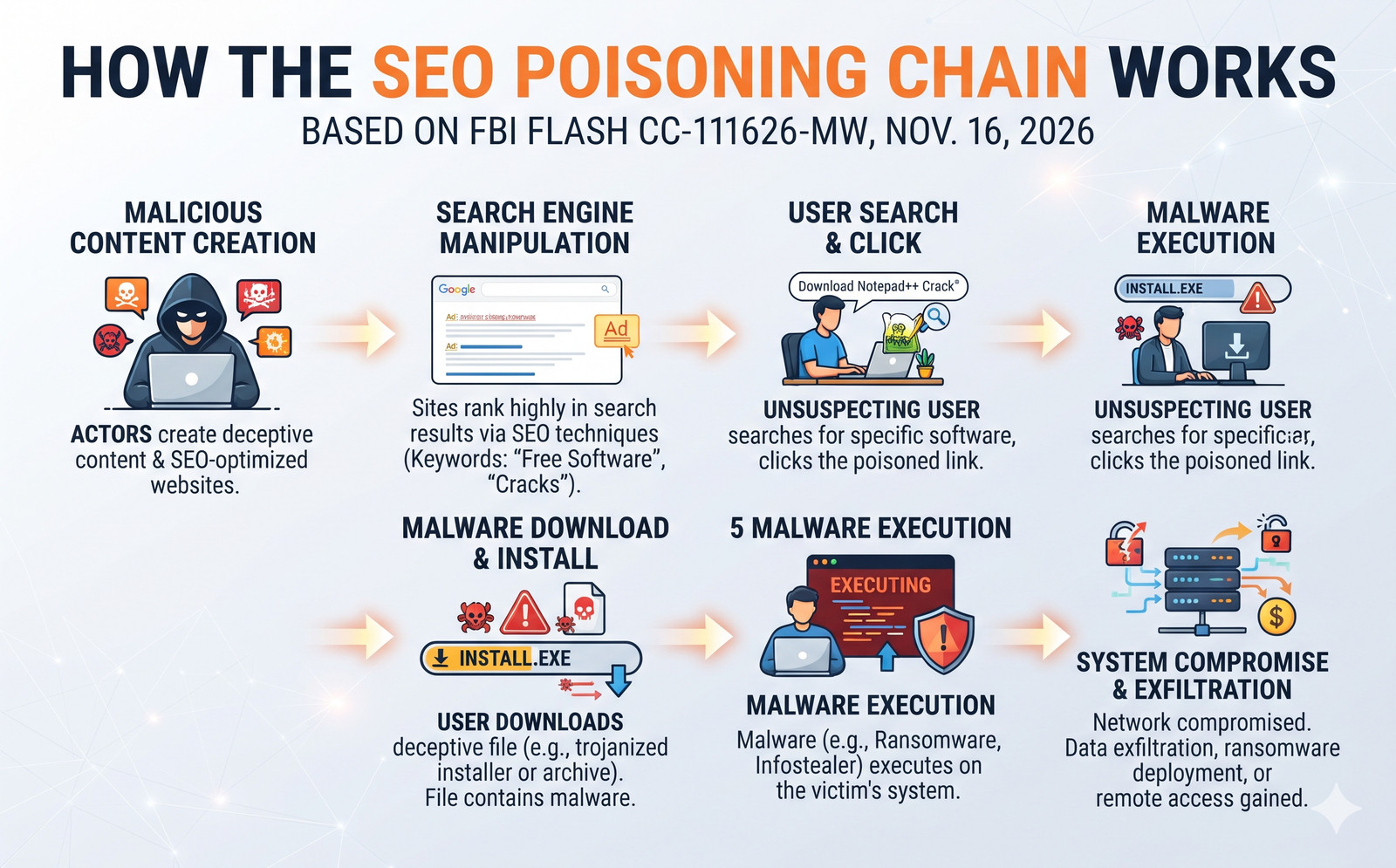
This is the part I want every business owner to read slowly. The FBI describes a chain that uses the same tools honest SEO uses, pointed at a criminal goal.
- Pick easy keywords. The attacker chose search phrases with little competition, such as a contract clause specific to one jurisdiction. Few real pages target those phrases, so a weak page can still rank.
- Find WordPress sites to break into. The FBI says the attacker scanned WordPress sites for the xmlrpc.php file. This is a standard WordPress feature that attackers often use to guess passwords.
- Log in with stolen passwords. The attacker then used compromised credentials. From there, the FBI says, they abused vulnerable plugins and themes, injected posts, and changed JavaScript files.
- Turn your site into a tool. Some hacked sites hosted the bait pages. Others redirected or filtered visitors, or quietly relayed traffic, so not every hacked site showed the bait.
- Push the bait up the rankings. Hidden links stuffed with keywords, plus planned backlinks, helped the bait pages rank beside legitimate results.
- Show the bait only to the right people. A filtering system decided who saw the bait based on location, how they arrived, their cookies and their IP address. So you might visit your own site and see nothing wrong.
That last point is why so many owners never notice. In the same alert, the FBI lists a related WordPress campaign that skips visitors who have admin cookies. In plain terms, if you are logged in to your own site, the bad code may hide from you.
Who is at risk
There are two kinds of risk here, and it helps to keep them apart. Your website can be used as bait. Your people can be the ones who take it. The table below separates the two.
| Risk | What it looks like | Who should act | First step |
|---|---|---|---|
| Your website is the bait | Strange pages indexed, odd search queries, new admin users, unknown plugins | Site owner, web developer, host | Run the 30-minute check below |
| Your staff are the target | Someone searches for a legal document, downloads a ZIP file and opens the JavaScript file inside it | Office manager, IT provider | Disconnect that computer from the network and call your IT support |
Law firms and legal teams
The FBI says the search terms were aimed at lawyers in firms and in-house legal departments, from partners and general counsel to litigation, privacy and legal operations teams, plus the people who choose legal technology. If you run a law firm, you carry both risks. Your WordPress site holds client trust, and your team searches for clauses and forms every day. If you are reviewing your firm’s site, my guide to law firm website intake and conflict checks covers what data your forms should and should not collect. Collecting less also limits what a break-in can expose.
Clinics, local services and small brands
The lures in this campaign were legal, but the method works on any WordPress site with a weak login. A dental clinic, an HVAC company or a boutique store has the same xmlrpc.php file and the same admin screen. Attackers do not need your site to be about law. They only need it to be trusted by Google and easy to get into.
Agencies and freelancers
If you manage several client sites, the FBI’s advice on least privilege matters to you. It recommends separating hosting accounts and sites so one site cannot write to another site’s files. One shared hosting account with ten client sites is one stolen password away from ten hacked sites.
Your 30-minute SEO poisoning check
You do not need to be technical for most of this. Grab your Search Console login and a WordPress admin login, and work through the list.
- Open the Security issues report in Search Console. Google says this report shows its findings if it decides your site was hacked or could harm visitors. A green check mark is good. Any listed issue needs attention today. Google explains how it works on its Security issues report help page.
- Check the Manual actions report. The FBI lists manual actions as one of the warning signs to watch for.
- Scan your search queries for things you never wrote about. In the Performance report, sort queries by impressions and look for legal phrases, contract terms or topics that have nothing to do with your business. The FBI names unrelated legal or business queries as a sign of abuse.
- Look for a sudden jump in indexed pages. Open the Pages report under Indexing. A spike you cannot explain often means someone added pages you did not create.
- Review every admin user in WordPress. Go to Users and filter by Administrator. The FBI describes another campaign that added hidden admin users with random names. If you do not know who a user is, find out before you delete it.
- Check your plugin list against what you actually use. Remove plugins and themes you no longer need. The FBI tells owners to remove unused plugins, themes, accounts and staging sites. The official WordPress hardening guide also says to delete plugins you do not use.
- Ask your developer about mu-plugins. “Must-use” plugins live in a separate folder and do not show in the normal plugin list. The FBI mentions hidden must-use plugins in more than one campaign, so ask someone with file access to look in wp-content/mu-plugins.
- Decide on xmlrpc.php. The FBI says to disable it if you do not use it. If an app or service needs it, rate-limit it and allow only what is required.
- Turn on multi-factor login for every admin and for your hosting account. The FBI recommends phishing-resistant MFA or strong MFA for administrators and hosting access. In my experience, this single step stops most attacks that rely on stolen passwords.
If you pay someone to maintain your site, send them this list and ask for a written reply. A good website maintenance retainer should already cover most of it every month, including updates, user reviews and backups.
Recently, a client with a beauty spa website in Newcastle, Australia, contacted me to fix their malware-infected website. The first thing I found was an old administrator account with the username “admin”. She had no idea who created this login. Furthermore, she was using Elementor as her page builder and had never updated it. Periodic maintenance for every website is truly important.
When auditing a newly taken-over WordPress site, the most common security oversights include lingering legacy administrator accounts, unpatched or abandoned plugins posing vulnerabilities, and a complete lack of multi-factor authentication (MFA) for high-privilege users.
If you think your site was hacked
Do not panic, and do not start deleting things at random. The FBI lists response steps for WordPress sites, and I would follow them in this order.
- Restrict the site and keep evidence. Put the site into maintenance mode or limit public access. Before you clean anything, save a copy of the files, database, logs and hosting settings.
- Reset every password from a clean computer. That means the hosting panel, SSH, SFTP, WordPress admins, database, API keys and CDN. Sign out all active sessions and revoke application passwords.
- Find out how they got in. In my experience, this is the step people skip. The FBI’s advice is to close the entry point first, whether a weak plugin or a stolen password, and only then restore a clean backup. Otherwise they walk straight back in.
- Clean, then ask Google for a review. Once the site is clean, request a review in the Security issues report. Google says a review can take from a few days to a few weeks.
- Report it. The FBI asks victims to contact their local FBI field office, call 1-800-CALL-FBI, or file a report at ic3.gov.
If you have lost access to your own hosting or admin accounts, or the person who built the site has disappeared, start by getting ownership back. My website rescue and handover checklist walks through who should hold which logins.
Protect your team as well as your site
The actual infection in this campaign happens on a person’s computer, not on the website. A staff member searches for a document, lands on a poisoned page, downloads a ZIP file and opens the script inside.
The FBI’s advice for that moment is specific. If the file was downloaded but not opened, leave it alone (no unzipping, no previews) and write down the website address, the search used, the time and the file name. If the script was opened, disconnect the computer from the network but leave it switched on unless your incident plan says otherwise. Once your IT team has checked which logins were exposed, change passwords from a different, clean device. The FBI also warns that deleting the downloaded file alone does not make the computer safe again. It recommends reimaging the machine if follow-on malware or stolen credentials are confirmed.
For prevention, the FBI suggests disabling Windows Script Host where your business software does not need it. Ask your IT provider about this. It can stop the kind of script file this campaign used from running on staff computers.
Tell your team one simple rule: legal templates and contract samples come from known sources, never from a random ZIP file in a search result.
Kanika’s take
Common mistakes after an SEO poisoning alert
- “My site looks fine, so I’m safe.” The filtering described by the FBI means the site can look fine to you and still serve bait to others.
- “I’ll just restore yesterday’s backup.” If you do not close the hole first, the attacker can log back in with the same stolen password.
- “Security plugins handle everything.” A plugin helps, but it does not replace MFA, removing unused accounts, or checking your search data.
- “We’re not a law firm, so this doesn’t apply.” The bait was legal. The break-in method was generic WordPress.
- “The FBI took it down, so we’re done.” The DOJ removed the malware from more than 100 servers, but the FBI still issued its recommendations four days later. I would not assume every hacked site has been cleaned.
Choosing a platform for a rebuild? My comparison of WordPress vs Webflow for business covers ownership, security and who handles updates.
SEO poisoning FAQ
What is SEO poisoning?
SEO poisoning is when attackers use search engine optimization tricks to place harmful pages in search results next to real ones. In the Gootloader campaign, those pages lived on hacked WordPress sites and offered fake documents that installed malware.
How can I tell if my WordPress site was used in the Gootloader campaign?
Check the Security issues and Manual actions reports in Search Console, look for search queries and indexed pages you never created, and review your admin users and plugins. The FBI names unrelated legal or business queries and sudden new indexed pages as warning signs.
Should I disable xmlrpc.php on WordPress?
The FBI recommends disabling xmlrpc.php if you do not use it. If a service needs it, rate-limit it, allow only the methods you need, and watch login attempts. Ask your developer before you switch it off, because some apps and plugins may rely on it.
Is Gootloader still a threat after the takedown?
The DOJ announced on November 12, 2026 that it removed Gootloader from more than 100 servers. The FBI still published its recommendations on November 16, and the alert does not say the threat is over. It is safest to treat the advice as current.
How long does Google take to remove a hacked site warning?
After you fix the issues, you request a review in the Search Console Security issues report. Google says a review can take from a few days to a few weeks.
Who should I report a Gootloader infection to?
The FBI asks victims to report suspected Gootloader intrusions to their local FBI field office, to 1-800-CALL-FBI, or to the Internet Crime Complaint Center at ic3.gov.
The bottom line on SEO poisoning
The FBI alert is a reminder that SEO poisoning is not a theory. Real WordPress sites were turned into bait, and the FBI ties the activity to real ransom payments. The fix for most small businesses is not expensive: MFA on every admin login, fewer plugins, fewer old accounts, and a monthly look at Search Console. Block 30 minutes this week and run the check above.
Found something you cannot explain? Would you rather have someone check it for you? My WordPress malware removal service covers cleanup, finding the entry point, and locking the site down afterward.
Sources and how we checked this
- Federal Bureau of Investigation, FLASH CC-111626-MW: Gootloader Malware Using SEO Poisoning and Compromised Websites to Gain Initial Access, November 16, 2026.
- U.S. Department of Justice, Gootloader Malware Disrupted in International Cyber Operation, November 12, 2026.
- Google Search Console Help, Security issues report, accessed November 18, 2026.
- WordPress Developer Resources, Hardening WordPress, accessed November 18, 2026.
Every claim in this article was checked against the sources above on November 18, 2026. If something changes, this article is updated and the date above changes.