Paid advertising can bring the right people to your website faster. It cannot make an unclear offer persuasive, repair a broken enquiry form or create trust that the page has failed to establish. When campaigns generate clicks but few qualified enquiries, the instinct is often to change audiences, keywords or bids. Sometimes the more expensive leak is on the website.
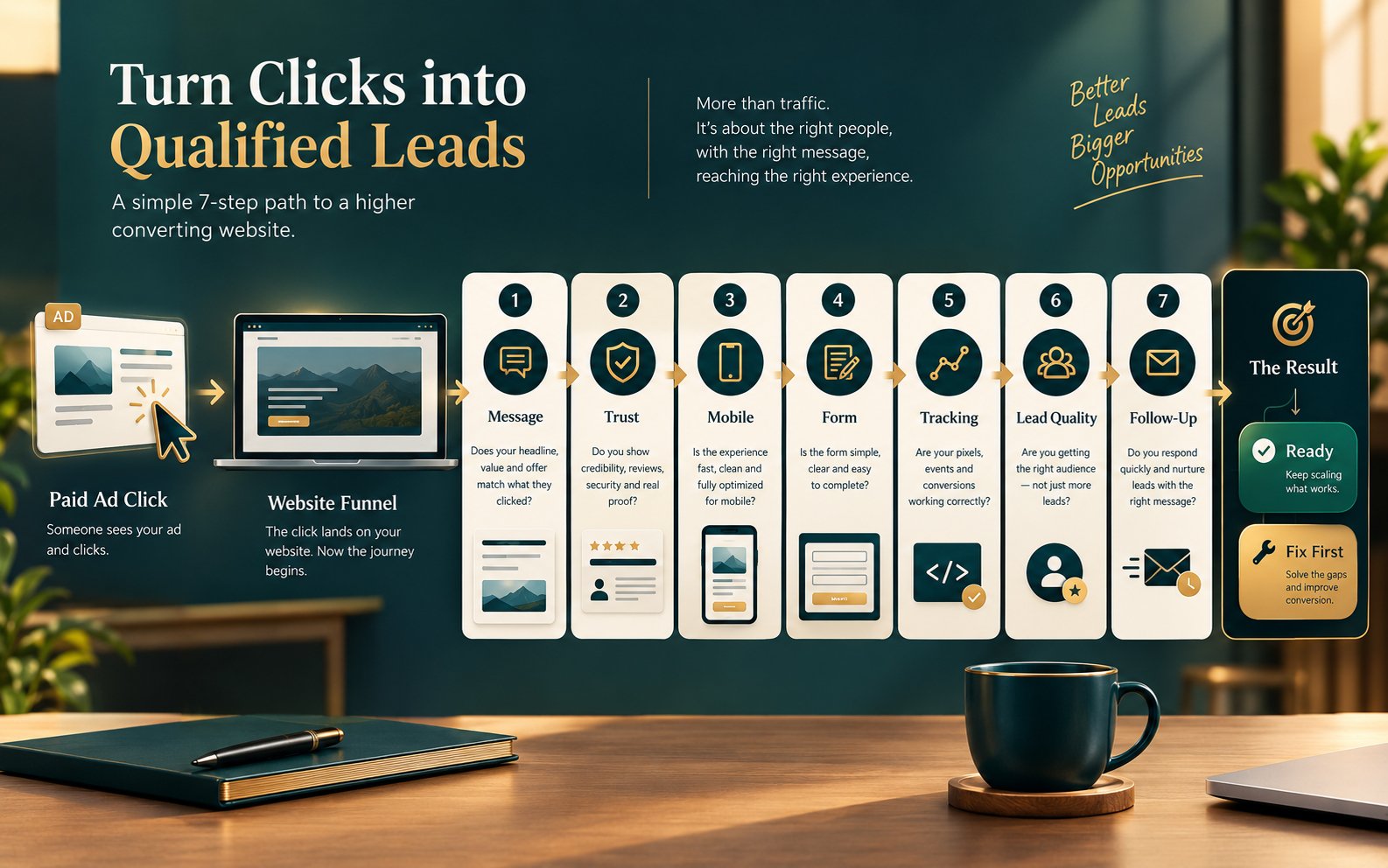
A website conversion audit checks whether your site can guide paid visitors from first impression to a measurable business action. It connects campaign promise, landing-page relevance, mobile usability, proof, form design, tracking and follow-up. The purpose is not to make a page “perfect” before advertising. It is to remove preventable friction and make the first advertising data trustworthy.
Key Takeaways
- Campaign readiness is a chain: traffic quality, message match, page experience, conversion action, measurement and follow-up must work together.
- A homepage may be suitable for branded awareness, but a focused landing page usually gives high-intent campaigns a clearer path.
- Test forms, calls, bookings and thank-you states on real devices before launch; do not assume a plugin installation equals reliable tracking.
- Separate primary conversions from micro-conversions so campaign optimisation is based on business value rather than easy clicks.
- Use a go/no-go scorecard to decide whether to launch, launch with controlled tests or pause for essential repairs.
Start with evidence, not a larger ad budget
Use this framework to identify where a visitor may hesitate, abandon or disappear from your reporting before you pay for more traffic.
Review the landing-page fundamentalsWhat a Website Conversion Audit Actually Measures
A technical website audit asks whether pages can be crawled, load correctly and avoid errors. An SEO audit asks whether search engines can understand and rank the site. A website conversion audit asks a different question: can a motivated visitor confidently complete the next useful action?
That action may be a purchase, consultation booking, quote request, phone call, application or qualified enquiry. The audit follows the visitor’s decision journey and tests the connections between its stages. A persuasive landing page with an unreliable form is not ready. Neither is a fast page that promises something different from the ad, or a successful booking flow that no analytics platform records.
Google’s own advertising guidance emphasises the relationship between ads, keywords and landing pages. The landing page should reflect the offer and call to action that attracted the click. This is more than a Quality Score consideration; it is a human expectation. If an ad promises a manufacturing website audit but the click opens a generic “all digital services” page, the visitor must work too hard to confirm relevance.
Why Audit the Website Before Buying More Traffic?
Paid media accelerates whatever already happens after the click. A clear offer becomes visible to more relevant prospects. A confusing offer reaches more people who leave confused. Without conversion tracking and lead-quality feedback, the business may not know which of those outcomes occurred.
A pre-campaign audit reduces three forms of waste:
- Attention waste: visitors arrive but cannot immediately connect the page to their need.
- Interaction waste: interested people encounter slow pages, intrusive overlays, poor mobile layouts or demanding forms.
- learning waste: conversions are missing, duplicated or defined too loosely, so the campaign learns from unreliable signals.
The audit also creates a baseline. Record the current offer, page version, mobile behaviour, tracking events and lead-handling process before launch. Later changes can then be evaluated against something concrete rather than memory.
The Seven-Part Website Conversion Audit
1. Confirm the traffic-to-page match
Start with a simple mapping sheet: campaign, audience or keyword theme, ad promise, destination URL, primary action and proof required. Each major intent should reach a page that continues the same conversation.
Check the first screen without scrolling. Can a visitor identify what is offered, who it is for, why it is relevant and what to do next? Match important language from the campaign naturally, but do not turn the page into a list of repeated keywords. The offer, location or eligibility requirements, price conditions and deadlines should not change after the click.
A common mistake is sending every campaign to the homepage. A homepage serves several audiences and often contains several routes. That is useful for exploration but weak for a visitor who clicked a specific promise. A focused landing page can keep the headline, evidence and call to action aligned with one decision.
2. Test clarity and decision confidence
Ask a person unfamiliar with the business to view the page for five seconds, then explain the offer. If their answer is vague, the problem is unlikely to be button colour.
A strong page normally answers:
- What problem does this solve?
- Who is the service or product designed for?
- What is included—and what is not?
- Why should the visitor trust this provider?
- What happens after the visitor takes action?
For professional services, clarity includes process, appropriate scope, delivery expectations and the kind of client that is a good fit. For ecommerce, it includes price, variants, shipping, returns and product evidence. Your page does not need to answer every possible question before a visitor acts, but it should resolve the doubts most likely to block the next step.
If trust is the wider problem, use the practical checks in the small-business website trust checklist. Real contact details, transparent policies, specific proof and consistent business identity matter more than decorative security icons.
3. Audit proof, risk and objections
Evidence should sit close to the claim it supports. If the page says “experienced,” show relevant work, a credible process or a verified credential. If it promises easy implementation, explain onboarding. If the purchase creates financial or operational risk, address cancellation, ownership, support or handover before the form.
Use only proof you can substantiate: named case studies with permission, authentic testimonials, real portfolio examples, certifications and clearly sourced data. Kanika Gupta’s own positioning—18+ years of experience and 400+ projects for international clients—belongs where it helps a buyer evaluate delivery confidence, not repeated in every section.
For service businesses, a useful proof sequence is: relevant outcome, what was changed, who the work suited and a link to the supporting case study. Visitors who need more evidence can review the website portfolio without interrupting the primary journey.
4. Test the conversion path on mobile
Do not review the page only on a designer’s desktop. Test common mobile widths, a real phone, slower connectivity and both touch and keyboard navigation. Google’s current Core Web Vitals focus on loading, responsiveness and visual stability: Largest Contentful Paint, Interaction to Next Paint and Cumulative Layout Shift. These are valuable experience signals, but the audit must also observe the actual task.
Complete the conversion as a customer would. Check whether:
- the main message and call to action remain visible and readable;
- buttons are easy to tap and do not compete with chat widgets;
- menus, pop-ups and cookie controls do not trap the screen;
- telephone, email and booking links open the correct action;
- form labels remain visible after a field is completed;
- errors explain what happened and how to fix it;
- the success state confirms the submission and the next response step.
W3C guidance recommends explicit labels for form controls and clear notifications for errors and successful submissions. These practices help disabled visitors and also reduce ambiguity for everyone completing a form in a hurry.
If performance issues are significant, review the available website speed optimisation service. Speed work should support the conversion path, not become a score-chasing exercise disconnected from user behaviour.
5. Reduce form and booking friction
Every field creates effort, but removing all qualification can flood a business with unsuitable leads. Design the form around the decision the team needs to make next.
For an initial consultation, name, work email, business type, project need and a short context field may be enough. Budget or timeline questions can be appropriate when they meaningfully influence fit. Explain why sensitive information is requested, mark optional fields clearly and avoid asking the visitor to repeat data during booking.
Test validation, spam protection, confirmation emails, CRM delivery and notifications. Submit from more than one browser and use addresses outside the company domain. Confirm that a successful-looking form actually creates the expected record. For booking tools, test time zones, availability, rescheduling, reminder messages and the route back to the website.
6. Define and validate conversion tracking
Choose the business action before configuring analytics. Google Ads supports separate conversion actions for website purchases, sign-ups, calls and offline outcomes. Treating every click as equal can distort campaign optimisation.
Create a measurement plan with two levels:
- Primary conversions: completed purchase, qualified enquiry, confirmed consultation, accepted application or another action with direct business value.
- Diagnostic events: form start, pricing view, case-study view, telephone click, email click, calendar open or checkout start.
Diagnostic events explain behaviour; they should not automatically be treated as campaign success. Test each event in analytics debug tools and the advertising platform. Check that page reloads do not duplicate conversions, internal staff visits are handled appropriately and consent settings match the business’s legal requirements. Privacy and consent obligations vary by market, so obtain qualified legal advice for the countries you target.
A campaign should also distinguish lead creation from lead quality. If the sale happens later, capture source information in the CRM and create a practical feedback loop between sales and marketing. Otherwise, low-quality form submissions may look like strong campaign performance.
7. Audit the post-conversion response
The website journey does not end at “Thank you.” Tell the prospect what was received, when to expect a response, who will contact them and what to prepare. Deliver promised downloads immediately. For consultation requests, offer a clear booking route without making people submit the same information twice.
Then test the internal process. Does the right person receive the lead? Is it visible in the CRM? Is there a response-time target? Can the team identify the campaign and landing page? A slow or inconsistent follow-up process can make a capable website appear ineffective.
Not sure whether the page needs repair or redesign?
Compare the offer, mobile journey, tracking and lead path before commissioning a full rebuild. The right scope may be a focused conversion repair rather than a new website.
Use the redesign decision frameworkA Practical Website Conversion Audit Scorecard
Score each area from 0 to 2: 0 means missing or broken, 1 means present but uncertain, and 2 means verified with evidence. The total is a decision aid, not a universal benchmark.
| Audit area | Two-point standard | Evidence to retain |
|---|---|---|
| Message match | Ad, keyword, page headline, offer and CTA describe the same promise. | Campaign-to-page mapping sheet |
| Offer clarity | A new visitor can explain the offer, audience and next step quickly. | Five-second test notes |
| Trust and proof | Specific, verifiable evidence addresses the buyer’s principal risk. | Proof inventory and approvals |
| Mobile experience | The primary task works on real devices without obstruction or layout failure. | Device test log and screenshots |
| Form or checkout | Inputs, validation, success messages and notifications work end to end. | Test submissions and CRM records |
| Measurement | Primary and diagnostic events fire once, carry the right data and appear in reporting. | Debug and platform test records |
| Follow-up | The visitor receives clear confirmation and the team has an owned response process. | Confirmation copy and workflow owner |
12–14: ready for a controlled launch, with ongoing testing. 8–11: launch only after resolving the highest-risk gaps and keep the initial budget controlled. 0–7: pause broad acquisition; the campaign is likely to produce ambiguous or needlessly expensive learning.
Common Pre-Launch Mistakes
Making the page longer instead of clearer
Length is not a conversion strategy. Add information that resolves a real decision; remove repetition that delays it. A complex B2B service may need detailed proof, while a straightforward appointment campaign may need a much shorter page.
Optimising for clicks instead of qualified outcomes
A prominent CTA can increase activity while reducing lead quality if the offer is vague. Define who the service suits and what happens next. A smaller number of suitable enquiries may be more valuable than a larger number of unqualified submissions.
Changing campaign and website variables at the same time
If the audience, ad, offer, page layout and form all change together, you cannot tell what caused the result. Fix critical defects first, establish a stable baseline, then test one meaningful hypothesis at a time.
Using a single thank-you-page view as unquestioned proof
A thank-you page can be revisited or refreshed. Validate the underlying action, prevent duplicate events and compare platform reporting with actual leads or orders. Measurement is a system, not a tag pasted into a template.
Ignoring the existing website journey
Paid visitors may open the navigation, read an article, inspect the About page or review case studies before converting. A focused landing page does not excuse an inconsistent wider site. Service businesses should ensure their expert profile, portfolio and contact details support the claims made in the campaign.
Should You Use the Homepage or a Dedicated Landing Page?
Use the homepage when the campaign is primarily branded, the audience needs broad exploration or the business offers one simple proposition. Use a dedicated landing page when the campaign targets a specific service, audience, location, problem or offer.
A dedicated page is especially useful when you need precise message match, campaign-specific proof, a distinct form or clean measurement. It should still feel like part of the same business: consistent identity, accessible navigation where appropriate, real policies and credible contact information.
If your current site cannot support campaign-specific pages cleanly, a flexible WordPress development setup can make landing-page creation, tracking and controlled iteration easier without fragmenting the brand.
What to Fix First When the Audit Finds Too Much
Prioritise by risk, not by visual preference:
- Broken forms, checkout, calls, booking or tracking.
- Misleading or inconsistent campaign-to-page promises.
- Mobile blockers, severe performance issues and inaccessible form interactions.
- Missing decision information and unsupported trust claims.
- Secondary design refinements and lower-impact content changes.
A conversion audit does not guarantee campaign success. Market demand, competitive offers, pricing, targeting, creative and sales execution still matter. It does make the next paid test more interpretable: when the destination and measurement are reliable, the business can learn from traffic instead of merely buying it.
Prepare the website before you pay for the click
Kanika Gupta combines conversion-focused website strategy, WordPress implementation and digital marketing experience to identify the practical gaps between traffic and enquiry.
Discuss a website conversion auditFrequently Asked Questions
What is a website conversion audit?
A website conversion audit is a structured review of how effectively a website turns suitable visitors into measurable actions such as enquiries, bookings, calls or purchases. It examines message clarity, trust, page experience, forms, tracking and follow-up rather than judging design alone.
Should I audit my website before running Google Ads?
Yes. At minimum, confirm that the landing page matches the ad, works on mobile, explains the offer, completes the intended action and records that action correctly. This does not guarantee profitable ads, but it reduces preventable waste and makes campaign data more reliable.
How do I know if my website is ready for paid traffic?
Your website is ready for a controlled test when the offer and audience are clear, the conversion path works on real devices, proof addresses key objections, primary conversions are verified and the team can respond to leads. Use the scorecard in this guide to identify unresolved risks.
Do paid ads need a dedicated landing page?
Not always. A homepage can work for branded or broad discovery campaigns. A dedicated landing page is usually better when the ad promotes a specific service, audience, location or offer because the message, evidence and call to action can remain focused.
What should be tracked as a website conversion?
Track the action that represents real business value, such as a completed purchase, qualified enquiry or confirmed consultation. Track form starts, telephone clicks and pricing views as diagnostic events, but do not automatically treat every interaction as a primary conversion.
Can a website conversion audit guarantee more leads?
No. An audit can identify and prioritise friction, measurement errors and trust gaps, but results also depend on demand, offer strength, targeting, pricing, competition and follow-up. Treat the audit as preparation for better experiments, not a promise of a specific outcome.