By Kanika Gupta | Reviewed 16 October 2026
A website appointment booking system should do more than display an attractive calendar. It needs to offer the right appointment, protect your team’s availability and leave a usable record of what happened. Otherwise, a visitor can receive a confirmation while your consultant misses the booking, your CRM loses the source or your reporting counts a click as a lead.
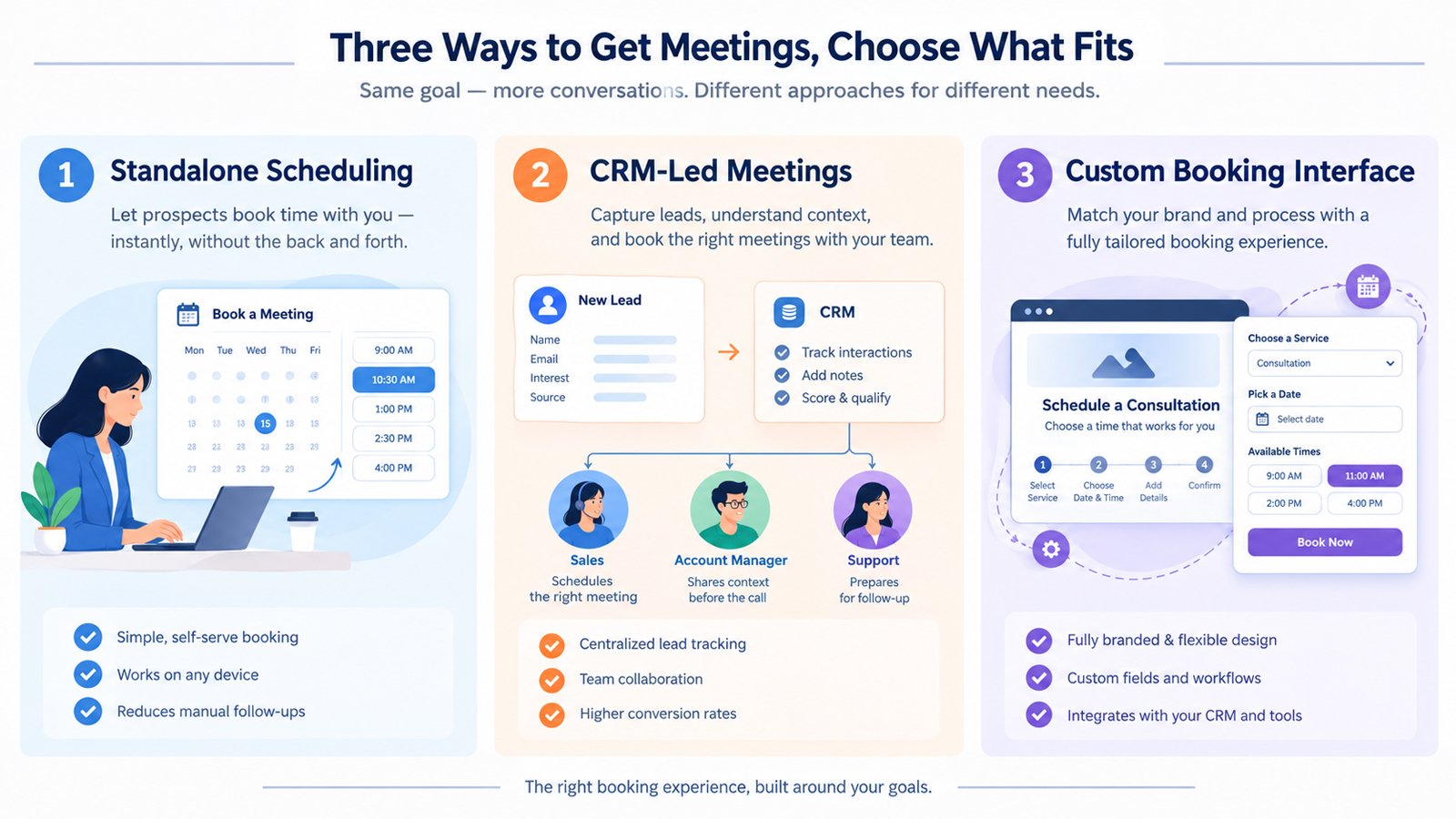
Quick Answer: Choose Calendly when independent scheduling is the priority, HubSpot Meetings when your team already works in HubSpot, and custom booking when a documented workflow cannot be handled reliably by either. Compare availability rules, qualification, handover, data ownership and completed-booking tracking before design. A custom-looking website does not necessarily need a custom-built scheduling engine.
Key Takeaways
- Select the operating model before comparing calendar widgets or subscription prices.
- Separate one-to-one, shared-availability and distributed-team appointments.
- Use a branded front end over an established engine before commissioning a complete scheduling application.
- Measure confirmed bookings and qualified attended meetings, not just booking-button clicks.
- Make cancellation, staff changes and integration failures part of your acceptance tests.
For consultants, accountants, agencies and advisory firms, the booking journey is part of the sales experience. Good consultant website design explains why a conversation is worthwhile before asking someone to choose a time.
Define the appointment before choosing the software
“Book a consultation” can describe several different transactions. A free introductory call, a paid advisory session and a meeting requiring two partners do not need identical rules.
Write a one-sentence definition: who can book, what they receive, who attends, how long it lasts and what must happen beforehand. For example: “A new business prospect can book a 20-minute introductory video call with one available consultant after choosing a relevant service.” That sentence is more useful than a wishlist of integrations.
Next, identify the commitment. Is the appointment confirmed immediately, subject to approval or only confirmed after payment? Label an approval workflow “Request a consultation,” not “Your meeting is booked.” Clear expectations matter more than making every journey appear instant.
Qualification should answer a practical routing question. Ask for the service needed and a short project summary when those answers change who should attend. Avoid collecting a full discovery questionnaire merely because the form supports extra fields.
Compare your website appointment booking system options
| Approach | Strongest fit | Main trade-off | Prove before committing |
|---|---|---|---|
| Calendly | Scheduling is the main need; the business may use another CRM. | Handover and reporting across separate systems need deliberate configuration. | Calendar conflicts, required event types and the exact integration path. |
| HubSpot Meetings | HubSpot already supports the team’s contact and sales workflow. | Useful team capabilities depend on subscription and seat eligibility. | Each organiser’s access, routing behaviour and record ownership. |
| Custom interface, existing engine | The website needs tailored questions, presentation or pre-booking logic. | More implementation work while retaining the engine’s limits. | Supported APIs, confirmation states and an upgrade-safe implementation. |
| Custom scheduling application | Documented resource or approval rules cannot be met by existing tools. | The business takes on development, reliability and support responsibility. | Concurrency, calendar reconciliation, failure recovery and maintenance ownership. |
When Calendly is the sensible starting point
Consider Calendly when you want scheduling without reorganising your business around a CRM. A solo advisor may need one introductory appointment; a growing practice may need several meeting types, reminders and team distribution.
At the review date, Calendly’s official pricing page lists a Free plan with one event type and one connected calendar. Standard adds multiple event types, additional calendar connections and automated reminders. Teams adds round-robin scheduling and routing. Check the current billing option and feature entitlement rather than assuming every paid plan includes every team feature.
The practical limitation is not necessarily the scheduler. It may be the journey around it: which service page sent the visitor, whether an existing client should reach their usual advisor and how a cancellation updates the sales record. Test those requirements instead of treating a working calendar embed as a finished implementation.
When HubSpot Meetings deserves the first trial
If staff already manage prospects in HubSpot, start by testing the native scheduling workflow. Introducing another system is justified only when it provides a capability your business actually needs.
HubSpot’s scheduling documentation distinguishes a single branded one-to-one page available to free-tool users from additional capabilities requiring eligible subscriptions and seats. Team pages require a supported Sales Hub or Service Hub subscription and assigned Sales or Service seats for participating users.
Check whether the meeting needs everyone available together or one available member of a team. These are different scheduling rules. Also test what happens when an organiser loses access or leaves the firm. A booking page is an operational asset, not something that should depend indefinitely on one employee’s setup.
When custom booking is justified
Custom booking is not one product category. It can mean a tailored WordPress form connected to a supported service, a custom interface over a scheduling API or a completely bespoke availability engine.
Start with the least complex option that satisfies the requirements. Brand colours, a different page layout or a few qualification fields rarely justify rebuilding calendar availability from scratch.
A stronger case might involve appointments requiring a specialist, a particular room and an approval step, with different rules for existing clients. Even then, evaluate specialist software before assuming bespoke development is necessary.
If a custom engine is commissioned, specify how it prevents two visitors claiming the same slot, handles delayed responses and reconciles calendar changes. Ask for logs, recovery procedures and documentation. These are part of the product, not optional extras after launch.
A decision framework for professional firms
Use three gates. First, eliminate any setup that fails a non-negotiable requirement, such as secure handling of the required information or the correct attendance rule. Second, pilot the complete journey. Third, compare twelve-month ownership costs for the options that pass.
For the pilot, give each requirement a simple status: works natively, works through a supported integration, needs custom development or fails. This exposes a cheap subscription with an expensive implementation without pretending that an arbitrary numerical score is scientific.
Consider three illustrative businesses, not client case studies:
- Independent management consultant: one organiser, introductory calls and an existing contact form. Trial standalone scheduling first.
- Advisory firm already using HubSpot: several consultants and established ownership rules. Test native meetings before adding another scheduling subscription.
- Specialist consultancy with approval gates: certain enquiries must be reviewed before access to a specialist’s calendar. Evaluate qualification plus approval, potentially with a tailored interface.
Do not use booking software to compensate for unclear positioning. If people cannot understand the offer, follow the broader professional-services investment framework before assuming a new tool will fix enquiries.
How much does an online booking system really cost?
There are four budgets: software, implementation, ongoing support and the time staff spend handling exceptions. Comparing only the monthly licence hides most of the decision.
Calendly’s public annual-billing view currently lists Standard at US$10 per seat per month and Teams at US$16. These are dated software examples, not a quote for a complete website booking project. Verify taxes, currency, billing term, add-ons and current checkout pricing.
For HubSpot, calculate the incremental cost of the eligible seats and features you need, considering what the firm already pays for. Do not compare an entire CRM package against one scheduler licence as though they provide equivalent scope.
Request separate implementation prices for configuration, website embedding, qualification, supported integrations, tracking, testing and handover. Bespoke work should identify a maintenance budget and responsibility for API changes. If support is unclear, compare a maintenance retainer with pay-as-you-go support before launch.
Make booking work on an international professional website
Show the appointment duration, format, organiser and next step before the calendar. Explain whether it is an introductory conversation or paid advice. State the currency and cancellation terms before payment, where applicable.
Verify the displayed time zone rather than relying on a visitor to infer it. Test bookings around US, UK, Canadian and Australian daylight-saving changes, including differences between regions. A UAE visitor should also be able to confirm the displayed local time without mental conversion.
Choose deliberately between an embedded calendar and a hosted booking page. An embed keeps visitors within the site but adds a third-party interface and loading dependency. A hosted page can simplify the website but changes the navigation and measurement journey. Neither is automatically better.
On WordPress, give the embed adequate space and a descriptive title. Check caching, script optimisation, cookie preferences and mobile scrolling on the published page. Keep a clearly labelled alternative contact route available when the calendar cannot load.
W3C’s forms guidance emphasises identifiable controls, clear instructions and useful error feedback. Test the booking journey with a keyboard, including date selection, validation and confirmation. A recognisable software brand does not prove your particular embed is accessible.
Keep confidential case information out of introductory booking fields. Review vendor agreements, access, retention and applicable privacy requirements with appropriate advisors. This is implementation guidance, not legal or compliance advice. Broader trust considerations are covered in the guide to professional websites for international clients.
Track completed bookings without confusing activity with revenue
Use a small event specification. Record the booking CTA click, the scheduling start where observable and the confirmed appointment. Define these as separate stages. Opening a popup does not confirm an appointment.
A developer might name custom events booking_cta_click, booking_started and booking_completed. These are proposed names, not events guaranteed by either platform. Trigger completion from a supported confirmation signal or validated server-side integration. A public thank-you-page view alone is weak evidence because it can be revisited.
Where booking identifiers are available, use an appropriate non-PII identifier in your operational deduplication process. Do not assume sending an identifier automatically deduplicates every GA4 event. Reconcile retries and reschedules before calling the numbers reliable.
Use Google’s event-parameter guidance to structure contextual fields and verify events in DebugView. Keep names, emails, phone numbers and consultation notes out of Analytics, including page URLs, under Google’s PII restrictions. Apply the relevant consent configuration.
Finally, review confirmed, attended, qualified and won opportunities separately. A tool that generates more appointments but fewer suitable conversations is not necessarily the better system.
The pre-launch booking checklist
Ask the implementation partner to demonstrate these checks using test records:
- Availability: a busy calendar slot cannot be booked; buffers, notice periods and holidays behave as agreed.
- Attendance: one-to-one, all-required-hosts and distributed-team bookings reach the correct person or people.
- Confirmation: the visitor and organiser receive consistent date, time zone, meeting link and next-step information.
- Changes: cancellation and rescheduling update relevant records without leaving misleading active appointments.
- Exceptions: disconnected calendars, unavailable staff and failed integrations have an owner and a recovery route.
- Experience: mobile, keyboard and error-state checks pass; the fallback contact route works.
- Measurement: a confirmed appointment is distinguishable from a click, repeat visit or test booking.
- Handover: the business controls accounts, billing, permissions and documentation, with a named support contact.
Run a small pilot before replacing every booking link. Include website visitors, an existing client and a visitor in another time zone. Retest after changes to calendars, staffing or website scripts.
Choose the simplest reliable system, then improve it
Start with Calendly when independent scheduling is enough. Start with HubSpot Meetings when HubSpot is already the team’s operating environment. Add custom components only for requirements you can demonstrate, and avoid a bespoke engine unless the operational case supports it.
The scheduler should support the promise your website makes. For the positioning and page structure around it, see the consultant website strategy guide. The goal is not the most elaborate calendar. It is a credible route from interest to a useful conversation.
Frequently Asked Questions
What is the best website appointment booking system for a small consulting firm?
Start with the simplest setup that meets your appointment rules. Trial Calendly for independent scheduling and HubSpot Meetings if the firm already uses HubSpot. Test availability, confirmation and staff handover before choosing.
Can I add appointment booking to my existing WordPress website?
Yes. You can link to a hosted booking page, embed a supported scheduler or build a tailored interface. Test the published implementation with your theme, caching, consent settings and mobile layout.
Is HubSpot Meetings free?
HubSpot’s free tools allow a single one-to-one scheduling page with HubSpot branding. Additional pages and team capabilities depend on subscription and seat eligibility. Confirm the requirements for every participating organiser.
How much does an online booking system cost?
Budget separately for software, implementation, support and staff administration. A free scheduler can suit a simple workflow, but paid seats, integrations, payment processing and custom development can change the total. Compare the full twelve-month scope.
Do I need custom booking to match my website branding?
Usually not. First test a branded page or supported embed from an existing scheduler. Commission custom components only when documented presentation or workflow requirements cannot be met reliably with standard options.
Should I count a booking-button click as a conversion?
Track it as an intermediate action, not a confirmed appointment. Measure completed bookings using a supported confirmation signal and review attendance, qualification and sales outcomes separately.