

Private school website strategy
A school website should not force every family into the same “Apply Now” button. It should help parents establish fit, understand the commitment, experience the school’s character and choose the next sensible admissions step.
What is a private school website admissions funnel?
A private school website admissions funnel is the planned route that helps a prospective family move from initial awareness to a meaningful admissions action. “Funnel” does not mean pressuring every visitor toward an application. It means reducing the right uncertainty at each stage and making the next action easy to understand.
The practical planning framework below uses four questions that recur throughout the family journey:
1. Is this school a fit?
Grades, learning approach, values, student support, location, schedule and the type of child or family the program serves.
2. Can we verify the promise?
Specific program information, faculty, accreditations where applicable, policies, authentic school-life evidence and transparent admissions details.
3. Is it feasible for us?
Tuition, fees, financial aid, transport, calendar, deadlines, required documents and the time involved in the process.
4. What should we do next?
Ask a question, attend an open house, book a tour, begin an application or contact an admissions officer.
This is a planning model, not an official industry standard. Its value is that it gives content, design, admissions and technology teams a shared way to evaluate every page.
Planning a school or education website?
Review KG Web Designer’s education, coaching and training website service to see how program structure, enquiry flow, mobile UX and admissions features can be planned together.
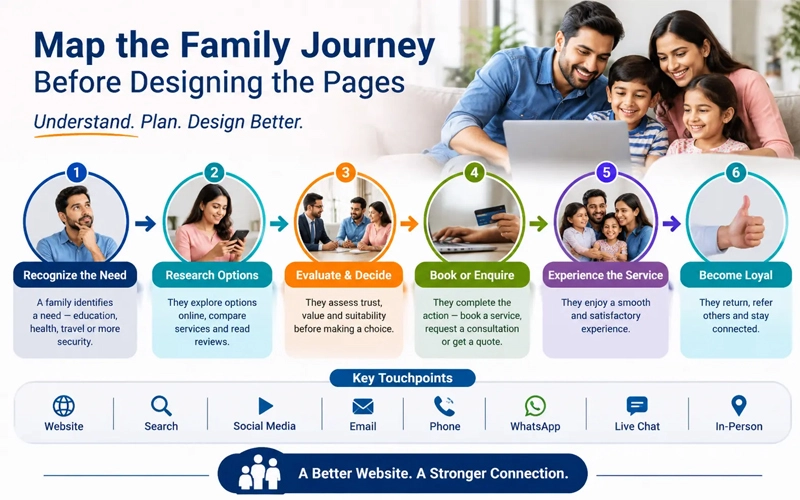
Explore education website designMap the family journey before designing the pages
A common redesign mistake is to begin with a homepage mood board and add admissions links later. Start with the family’s decisions instead. The page architecture should support those decisions whether a visitor arrives through Google, an advertisement, a directory, a social post, a recommendation or a direct link to a program page.
| Journey stage | Family’s question | Website evidence | Best next action |
|---|---|---|---|
| Discovery | Does this school serve my child’s age, location and broad needs? | Grade range, campus, concise positioning, program links and a clear admissions path | Explore the relevant division or program |
| Fit | How does learning and daily life work here? | Curriculum, schedule, teaching approach, student support, activities and representative school-life content | Compare programs or attend an information event |
| Trust | Can I verify the school’s claims and people? | Leadership and faculty profiles, policies, accreditation status where applicable, outcomes with context and authentic testimonials used with permission | Read the admissions guide or ask a focused question |
| Visit | Can we experience the school and meet the team? | Tour types, dates, campus details, accessibility information, parking and what to expect | Book a tour or open house |
| Application | What must we submit, pay and complete? | Steps, deadlines, documents, fees, assessment or interview process, platform instructions and support contact | Start or resume the application |
| Decision | What happens after an offer, waitlist or acceptance? | Decision calendar, enrollment deposit, financial obligations, next steps and a human contact | Accept, request help or complete enrollment |
The NAIS Principles of Good Practice call for clear dates and timeframes, transparent financial information, consistent communications and confidentiality in the admission process. Those are not merely policy matters. They are website content and workflow requirements.
The six-page admissions architecture most schools need
1. A homepage that routes instead of explaining everything
The homepage should identify the school, location, grades served and core educational proposition without relying on a vague slogan. Its next job is routing. A prospective kindergarten parent, a middle-school transfer family and an international boarding applicant may need different content and different visit options.
Use a small set of persistent actions such as “Explore Programs,” “Visit,” and “Apply.” Do not give every link equal visual weight. Emergency notices, parent portals, calendars and giving links can remain accessible without competing with the prospective-family path.
2. Program pages by division, grade band or learning need
A single academics page usually becomes a catalogue of department names. Strong program pages answer decision questions: what students do, how the day is structured, how learning progresses, what support is available, what facilities are relevant and what a family should explore next.
Write for parents first, then make terminology precise enough for educators. Use real photography with appropriate permissions. If outcomes, class sizes or ratios are published, define the timeframe and scope so a visitor can interpret them correctly.
3. An admissions hub that shows the complete process
The admissions hub should be the stable source for steps, dates, eligibility, documents, assessment or interview requirements, contacts and links to the school’s application platform. A numbered process is more useful than scattered buttons. If requirements vary by grade, campus or applicant type, show those branches explicitly.
State what happens after each action. “Submit an inquiry” is incomplete. Explain who responds, the normal response window established by the school, what the family should prepare and how to get help if no confirmation arrives.
4. A tuition and financial-aid page that supports informed choice
Price opacity does not remove the cost question. It moves that question into a phone call or causes some families to leave without asking. Where the school permits publication, show tuition by division, mandatory fees, what is included, payment schedules and the financial-aid process. If exact tuition cannot be published, explain why and give a useful route to obtain current figures.
The goal is not to make tuition look inexpensive. It is to help families understand the full commitment before they invest time in the application process. NAIS guidance specifically emphasizes complete information about total costs and other financial expectations before enrollment commitment.
5. A tour and open-house page built around attendance
NAIS research on independent-school marketing found that individual tours and group open houses were among the most effective admissions touchpoints in its 2024 survey of 344 respondents. The research also reports that growing enrollment and strengthening the school brand were leading marketing goals. The implication is practical: the website should make an appropriate visit easy to choose, book and attend, while the admissions team remains central to the relationship.
A visit page should specify tour format, campus, duration, available dates, who should attend, accessibility arrangements, parking or arrival instructions and the expected confirmation. The confirmation page and email should repeat the date and location, provide an add-to-calendar option and link to the most relevant tuition and program content.
6. An application page that prepares families before the portal
Many schools use a separate student information or enrollment platform. The public website should prepare the family before sending them away. List required documents, fees, deadlines, browser or account requirements, saved-progress behavior and the support contact. Use consistent language and visual cues so the external portal does not feel like an unexpected destination.
Need the admissions journey mapped before development?
KG Web Designer can translate your school’s programs, admissions steps and enquiry goals into a page plan, responsive design and integration brief. The scope should be based on your real process, not a generic school template.
Discuss your school website projectUse different forms for different levels of commitment
An inquiry, tour booking and application are not the same transaction. Asking for application-level details on a first-contact form increases sensitivity and workload before the family has decided to proceed.
| Form | Purpose | Request only what is needed now | Confirmation should provide |
|---|---|---|---|
| General inquiry | Start a conversation | Parent or guardian contact, child’s intended entry grade/year, question and relevant campus | Receipt, response expectation, admissions contact and helpful next links |
| Tour or event | Reserve a visit | Attendee details, student grade/year, selected slot and accommodations or visit needs where appropriate | Date, timezone, location, parking, agenda, cancellation route and calendar link |
| Application | Collect information needed for formal review | Only fields and documents required by the school’s approved admissions process | Submission status, missing items, fee status, next stage, deadlines and support route |
Every control needs a persistent label, not placeholder text alone. Required fields and formats should be explained before an error occurs. Error messages should identify the problem and help the person correct it. The W3C form-instructions tutorial and validation guidance provide implementation details, including server-side validation as well as accessible client-side feedback.
Privacy, accessibility and child-directed experiences require review
A website project should identify what data is collected, why it is required, where it is sent, who can access it, how long it is retained and how deletion or correction requests are handled. Avoid sending sensitive application details through ordinary email if the school’s approved enrollment platform or secure workflow is the appropriate destination.
For US sites, the Children’s Online Privacy Protection Act can apply when a covered operator collects personal information online from children under 13, including when a general-audience service has actual knowledge of such collection. The FTC’s COPPA guidance explains notice, parental consent, access, security and retention duties. Nonprofit status and the relationship between a school and a technology provider can affect the legal analysis. Design forms for parents or guardians where that matches the school’s process, and obtain qualified US privacy counsel for the school’s actual setup rather than relying on a website article.
Accessibility is also a legal and practical requirement, not a plugin badge. The US Department of Justice lists private schools among public accommodations under ADA Title III, while religious entities and specific circumstances may require separate legal analysis. Its web accessibility guidance recommends considering keyboard access, text alternatives, captions, contrast, form labels and error communication. The school should define the applicable jurisdiction and have legal counsel review obligations.
Connect the website to admissions operations
The website creates an expectation that the admissions team must be able to fulfill. Before selecting a booking tool, CRM or enrollment platform, map ownership and data movement:
- Submission: Which form or platform receives each action?
- Routing: Which person or team owns the response by campus, grade or inquiry type?
- Acknowledgment: Does the family receive an immediate, accurate confirmation?
- Follow-up: What school-defined service level applies, and how are overdue inquiries surfaced?
- Record: Which system is the source of truth for status and communication history?
- Handoff: How does a tour attendee become an application without duplicate entry or conflicting records?
- Exception: What happens if an integration fails, a slot is changed or an email bounces?
Automation should support human contact, not impersonate it. NAIS describes an admissions process that combines digital touchpoints with direct outreach and logs interactions in the student information system. A useful sequence may prepare a family for a visit and answer repeated questions, while an admissions officer handles circumstances, concerns and fit.
Measure progress without reducing enrollment to page views
Set up measurement around decisions, not vanity metrics. In Google Analytics 4, important website actions can be marked as key events. If a linked Google Ads account is used, selected key events can also become ad conversions. Google distinguishes the broader key-event measurement from conversions used for campaign reporting and bidding in its current Analytics guidance.
| Stage | Useful measure | What it can reveal | Important limit |
|---|---|---|---|
| Discovery | Visits to relevant program and admissions pages by source | Whether campaigns and search visibility attract plausible families | Traffic alone does not indicate fit |
| Interest | Inquiry completion and qualified inquiry rate | Whether content and forms support early questions | More inquiries may increase workload without improving enrollment |
| Visit | Tour booking, attendance and cancellation rate | Whether the site and reminders move families into human interaction | A booking is not an attended visit |
| Application | Application start, submission and completion time | Where instructions or the platform may create friction | Respect privacy and restrict analytics on sensitive fields |
| Enrollment | Offers, acceptances and enrolled students by appropriate source cohort | Which journeys contribute to the school’s actual goal | Attribution is directional, especially across long, offline decisions |
Define events and consent controls with the school’s privacy team. Do not capture form-field values, children’s information or sensitive application data in analytics. Test each event in the actual confirmation path, including mobile and external-platform transitions.
A practical eight-step implementation plan
- Interview admissions, marketing and school leadership. Document audiences, enrollment priorities, decision objections and process variations.
- Inventory the current site and systems. Record pages, forms, calendars, application platforms, tracking, ownership, privacy notices and known failure points.
- Map the six-stage family journey. Identify the question, evidence and next action at every stage.
- Design the information architecture. Give homepage, program, admissions, tuition, visit and application pages distinct jobs.
- Create an evidence plan. Assign owners for faculty details, dates, policies, fees, photography permissions, testimonials and outcome claims.
- Prototype the critical mobile paths. Test from a program page to tour booking, from tuition to financial aid and from admissions steps to the external portal.
- Integrate and test operations. Verify routing, confirmations, calendars, CRM or SIS records, error states, accessibility and privacy controls.
- Launch with a measurement and governance plan. Assign content owners, review dates, event definitions and a process for updating deadlines and fees.
Common admissions website mistakes
- Starting with “Apply Now” everywhere: early-stage families often need fit, cost and visit information first.
- Hiding tuition without an alternative: if figures cannot be public, explain how and when families receive them.
- Using one page for every division: the questions of an early-years parent and an upper-school transfer family are not identical.
- Sending visitors into a portal without preparation: list requirements, costs, deadlines and support before the handoff.
- Collecting too much data in an inquiry: match information requested to the current task.
- Automating without ownership: a confirmation email is not a response plan.
- Treating accessibility as a launch-day scan: navigation, forms, documents, video, calendar widgets and third-party platforms all require review.
- Reporting clicks as enrollment: connect website actions to attended visits, submitted applications and appropriate enrollment outcomes.
Frequently asked questions
What is the main conversion for a private school website?
There is rarely one conversion for every visitor. A tour booking is often a strong mid-journey action because it creates human contact, but inquiries, open-house registrations, application starts and submitted applications also matter. Choose the primary action by page and visitor stage, then connect those actions to attended visits and enrollment outcomes.
Should a private school publish tuition on its website?
Publish current tuition, mandatory fees and financial-aid information when school policy permits. If exact figures cannot be public, explain the scope of costs and provide a direct method to obtain them. Families should understand financial expectations before making an enrollment commitment.
How many fields should a school inquiry form contain?
There is no universal number. Ask only for information needed to route and answer the inquiry, such as parent or guardian contact details, intended entry grade and year, campus and the question. Keep application-level information in the approved application process.
Should tour booking and applications use the same form?
No. A tour booking reserves an experience; an application begins formal review and generally requires more information, documents and controls. Separate forms make the purpose, privacy context, validation and confirmation clearer.
What should be tracked in GA4 for school admissions?
Track meaningful actions such as inquiry completion, tour booking, open-house registration and application starts or handoffs. Mark appropriate actions as GA4 key events and use Google Ads conversions only where campaign optimization requires them. Do not send children’s information or form-field values into analytics.
How often should admissions pages be reviewed?
Assign owners and review dates based on change risk. Deadlines, tuition, fees, events, application instructions and contacts may need checks before and during each admissions cycle. Evergreen program content can follow a longer schedule, but it should still be reviewed for accuracy, representation and accessibility.
Build the website around your real admissions process
A useful school website is not a collection of attractive pages. It is a clear, accessible and measurable path that helps families make an informed decision and helps the admissions team respond consistently. Share your current website, target intake and admissions workflow to receive a tailored project recommendation.
Request a school website consultationSources and further reading
- NAIS Research: 2024-2025 State of Independent School Marketing
- NAIS Principles of Good Practice
- NAIS: Finding the Balance of Human Connection and Technology in Admission
- W3C WAI: Form Instructions and Validating Input
- FTC: Complying with COPPA, Frequently Asked Questions
- US Department of Justice: Guidance on Web Accessibility and the ADA
- Google Analytics Help: Conversions vs. Key Events