Quick Answer
In 2026, CA firms win trust online by reducing uncertainty before prospects make contact. A professional website should clearly explain services, demonstrate qualifications, show a transparent client process, display real trust signals, and reassure visitors that their financial information is handled securely. Trust—not design alone—is what converts visitors into enquiries.
TL;DR
- Trust is the deciding factor for CA firms because clients validate firms online before making contact.
- Dedicated service pages outperform generic service lists by helping visitors understand relevance quickly.
- Process transparency, team credentials, and client proof reduce perceived risk.
- Security, privacy, and mobile usability directly influence enquiry rates.
- Educational resources strengthen both Google rankings and AI search visibility.
- A professional CA website should build confidence before asking for an enquiry.
In 2026, trust is the real currency for CA firms online. Prospects don’t only compare fees or locations – they compare confidence. A client visiting a CA firm’s website is usually carrying one of two emotions: urgency (a deadline is near) or uncertainty (they don’t want a costly compliance mistake).
That’s why CA website design is no longer just about looking “professional.” Your website must communicate reliability, clarity, and process – fast. If it doesn’t, high-quality prospects will quietly move on to the next firm that feels easier to trust.
This blog explains what CA firms must include on their website to win trust in 2026 – with practical examples, a checklist, and a comparison between template vs custom sites. You’ll also find ready-to-use tables and downloadable graphics.
Why Trust Is Harder to Win in 2026 (and why websites now decide it)
A few years ago, a CA firm could rely mostly on referrals and a basic web presence. Today, even referrals validate you online before they call. Decision-making has changed:
- Clients check your website before sharing documents or booking.
- They scan service clarity, firm credibility, and responsiveness.
- They look for proof you’ve handled similar work.
- They want to know what happens after they submit an enquiry.
The website has become the first audit of your firm.
A strong chartered accountant website reduces perceived risk. A weak one increases it – even if your actual work quality is excellent.
Many firms also underestimate how much their homepage influences first impressions. If you’re planning a redesign, our guide on what makes a high-converting business website in 2026 explains how clarity, trust signals, and conversion-focused structure work together to improve enquiry quality across professional service businesses.
The trust pillars every CA website must cover
Think of trust like a structure. When prospects visit, they subconsciously assess:
- Clarity: Do you clearly explain what you do?
- Competence: Do you look capable and qualified?
- Proof: Have you done similar work before?
- Process: What happens after I contact you?
- Safety: Will my data remain secure?
If any pillar is missing, hesitation grows – and hesitation kills conversions.
Expert Insight from Kanika Gupta
Kanika Gupta
Founder, KG Web Designer
“Most CA firms assume prospects compare qualifications first. In reality, they compare confidence. Before a client uploads financial documents or books a consultation, they want reassurance that your firm is organized, responsive, and trustworthy. Your website should remove uncertainty at every stage of that decision.”
What builds trust on CA firm websites in 2026
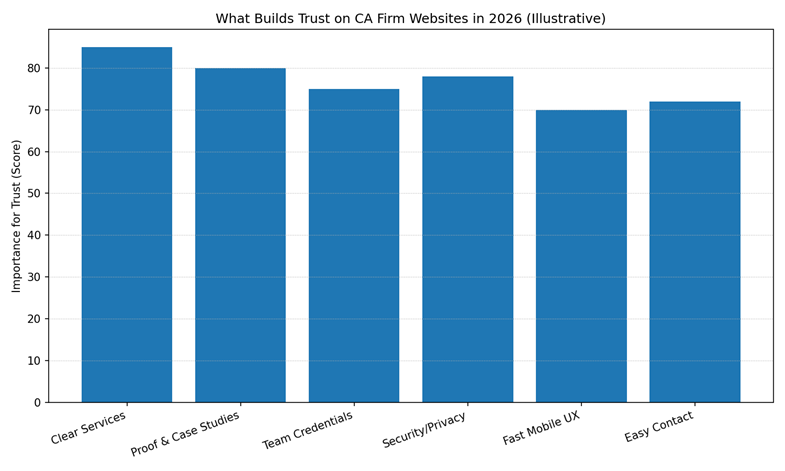
This chart visualises the most important trust drivers (illustrative scoring based on typical buyer behaviour): clear services, proof/case studies, team credentials, security/privacy, fast mobile UX, and easy contact.
1) Clear “Service Pages” (not just a list of services)
Most CA firm websites have a “Services” page with bullet points. That’s not enough in 2026.
A high-trust CA website design requires dedicated service pages so visitors can validate relevance quickly.
What “clear service pages” must include
For each major service (example: GST, ITR, Audit, ROC, TDS, Advisory), create a page that covers:
- Who this service is for (individuals, MSMEs, startups, NRIs, etc.)
- What problems you solve (late fees, notices, compliance gaps)
- Required documents (simple bullet list)
- Timelines (typical turnaround ranges)
- Fees positioning (not always exact pricing – even “starting from” helps)
- What happens after enquiry (step-by-step)
- FAQs specific to that service
Why this builds trust
Because clients don’t want to “talk to understand.” They want to understand enough to talk.
This is where accounting firm website design often fails – it assumes clients will call for details. High-value clients don’t. They compare websites first.
2) A “Process” section that reduces uncertainty
Clients hesitate when they don’t know what will happen next.
A strong CA website should clearly answer:
- How do you onboard a client?
- How do you collect documents?
- What communication method do you use?
- How do you handle deadlines and follow-ups?
- What do you deliver and when?
Best practice: show the process in 4–6 steps
Example flow:
- Submit enquiry / booking request
- Receive checklist + call confirmation
- Document collection (secure upload / WhatsApp + verification)
- Work execution + clarifications
- Filing / submission
- Confirmation + next compliance reminder
This isn’t “marketing.” It’s risk reduction.
3) Team and firm credibility (beyond “About Us”)
Your About page should not be a life story. It should be a trust page.
Must-have credibility elements
- Name(s) of CA(s) and key staff (with roles)
- Qualifications and membership details (keep it short, credible)
- Years of experience + types of clients served
- Industry exposure (e.g., retail, manufacturing, services, e-commerce)
- A photo of the office/team (even a simple real photo helps)
- Registrations / affiliations (where applicable)
Why this matters for chartered accountant websites
Clients evaluate CAs like they evaluate legal and medical professionals: they look for competence signals. If your website hides people behind generic copy, trust drops.
4) Proof that feels real (testimonials + case examples)
Testimonials are helpful, but in 2026 the format matters.
High-trust proof formats
- Short testimonials with context (industry/type of work)
- Google review embeds or review screenshots (if permitted)
- “Before/After” compliance outcomes (without sharing sensitive data)
- Mini case examples (2–4 paragraphs each)
Example mini case structure:
- Client type (MSME in trading)
- Problem (GST notice / mismatch / delayed filings)
- What the firm did (reconciliation + filing + representation)
- Outcome (notice resolved / compliance stabilised)
Even 3–5 mini cases can dramatically increase trust.
5) Security and privacy signals (must-have in 2026)
CA work involves sensitive data. Your website must show that you take privacy seriously.
Must-have security trust elements
- HTTPS (secure website)
- Spam-protected forms (reCAPTCHA or similar)
- Privacy policy (clear, visible in footer)
- Disclaimer (especially if you publish content)
- Secure upload option (if you collect documents online)
- “How we protect your data” (short section)
Clients may not read your privacy policy, but they notice its presence.
6) Fast mobile experience (and “easy contact” design)
Many CA websites are difficult on mobile:
- small text
- heavy banners
- slow pages
- contact hidden in menus
A modern CA website design must be mobile-first.
Mobile conversion essentials
- Click-to-call button (header or sticky)
- WhatsApp click button (with proper hours expectation)
- Map + office hours
- Fast loading pages (compress images, lightweight design)
- Forms that work smoothly on phone
If a user struggles for 15 seconds, you’ll lose them.
7) Resources that build authority without sounding like a textbook
Clients trust firms that educate clearly.
Add a “Resources” section with:
- Due-date calendar (monthly/quarterly compliance)
- Simple checklists (“Documents needed for ITR filing”)
- FAQ hub
- Guides for common scenarios (GST registration, TDS basics, notice response)
This strengthens authority and supports AI engines without turning your site into generic content.
Building trust is not unique to CA firms. Whether you’re an accounting practice, consulting firm, or advisory business, decision-makers evaluate websites in remarkably similar ways before making contact. The strongest professional service websites reduce uncertainty through clear positioning, industry expertise, client proof, and a structured enquiry journey rather than simply presenting company information. Our guide, Corporate Website Design for Consulting Firms: What High-Trust Brands Do Differently (And How They Turn Visitors into Clients), explores the trust-building principles used by high-performing consulting firms and shows how those same strategies can help professional service businesses convert more visitors into qualified enquiries.
Establish Absolute Authority Online
Your website should reflect the prestige and trust of your CA firm. I design high-authority, secure, and lead-focused platforms that help accounting professionals win high-value corporate clients.
Template vs Custom: what actually changes for trust?
Many CA firms ask: Do we really need custom work?
The honest answer: not always. But the moment you want high-quality, higher-ticket, or business clients – custom structure helps trust.
Comparison Table: Template vs Custom CA Website Design
| Factor | Template Website | Custom CA Website Design |
| First impression | Can look good | Can look premium + specific |
| Messaging | Generic | Tailored to your client type |
| Service clarity | Often shallow | Dedicated service + industry pages |
| Trust flow | Weak proof placement | Proof + process embedded where needed |
| SEO scaling | Limited | Strong foundation for topical authority |
| Conversions | Leads may be mixed quality | Better lead qualification |
What to include on the homepage (simple but high-converting)
In 2026, a CA firm’s homepage is not meant to explain everything.
Its job is to reduce uncertainty quickly and guide the visitor to the right next step.
Most homepage failures happen because firms try to:
- Showcase every service
- Tell their entire story
- Impress all audiences at once
This creates overload – not confidence.
A high-converting CA homepage focuses on clarity, not completeness.
- Clear, Specific Headline (Relevance First)
The headline is the most important trust signal on your homepage.
It should immediately answer:
- Who you help
- What type of work you handle
- Why someone should trust you
Avoid vague claims like:
- “Trusted Chartered Accountants”
- “Professional Accounting Services”
Instead, use specific positioning:
- “Chartered Accountants Helping Growing Businesses Stay Compliant”
- “GST, ITR & Audit Support for SMEs and Professionals”
Why this works:
- Prospects recognise themselves quickly
- Irrelevant visitors self-filter
- Confidence increases before scrolling
Clarity beats cleverness every time.
2. Short “What We Do” Snapshot (Not Full Services)
After the headline, add a high-level service snapshot – not details.
Limit it to:
- 4–6 core services maximum
Each should link to a dedicated service page:
- Income Tax & ITR
- GST Compliance & Filings
- Audit & Assurance
- ROC & Company Compliance
- Business & Tax Advisory
This keeps the homepage clean while allowing deeper exploration.
Trust improves when visitors feel:
“I know where to click next.”
3. Immediate Credibility Signals
Before asking for contact, show why you’re credible.
Effective homepage credibility includes:
- “X+ years of experience”
- “Serving SMEs, startups, and professionals”
- Google rating snippet (if strong)
- Industries served (icons or short list)
This is not about boasting.
It’s about removing doubt early.
If credibility appears too late, visitors disengage before reaching it.
4. Simple Process Overview (Risk Reduction)
One of the most overlooked homepage elements for CA firms is process clarity.
Add a short “How we work” section with 4–5 steps:
- Enquiry or booking
- Document checklist
- Review & clarification
- Filing / submission
- Confirmation + follow-up
This does three things:
- Reduces fear of complexity
- Sets expectations
- Makes engagement feel safe
When clients understand the process, they’re more willing to start it.
5. Trust Proof (Small, Real, Contextual)
Your homepage doesn’t need every testimonial you have.
It needs:
- 2–3 short testimonials
- With context (type of client / service)
For example:
“Handled our GST reconciliation and notices professionally. Clear communication throughout.”
This feels far more trustworthy than long, generic praise.
Avoid stock photos or exaggerated claims.
6. Clear Contact Options (Without Pressure)
A high-converting homepage makes contact easy – not urgent.
Best practice in 2026:
- Click-to-call number (visible on mobile)
- WhatsApp button (with timing expectation)
- Short enquiry form (name, phone, requirement)
- Office location & hours (footer or contact section)
Add a line like:
“We’ll review your requirement and share next steps clearly.”
This reduces anxiety and increases form completions.
7. Compliance & Security Signals (Footer Matters)
Many CA firms ignore the footer – but prospects don’t.
Your footer should include:
- Privacy policy
- Disclaimer
- Terms (if applicable)
- Secure HTTPS indicator
These are quiet trust signals, especially for new visitors. Similarly, for healthcare providers, trust is built through HIPAA-compliant patient booking systems that prioritize data privacy.
8. What NOT to Put on the Homepage
To keep it high-converting, avoid:
- Long “About Us” essays
- Every service detail
- Dense paragraphs
- Aggressive sales CTAs
- Stock photos with no context
The homepage is a guide, not a brochure.
Homepage Conversion Checklist (Quick Scan)
Before publishing, ask:
- Can a new visitor understand our focus in 10 seconds?
- Is it obvious who we are best suited for?
- Do we show credibility before asking for contact?
- Is the next step clear and low-pressure?
If yes, your homepage is doing its job.
Common CA website mistakes to avoid
Most CA firm websites don’t fail because they look unprofessional.
They fail because they introduce small moments of doubt and doubt is costly in a profession built on accuracy, compliance, and risk management. That’s why many accounting firms invest in specialized corporate website design services to build credibility with clients, investors, and regulatory stakeholders.
In 2026, prospects don’t analyse these issues consciously. They sense them and quietly move on.
Below are the most damaging CA website mistakes and why they hurt conversions.
1. Vague, Generic Website Copy
One of the most common mistakes is using language that could apply to any CA firm.
Phrases like:
- “Trusted professionals”
- “Quality accounting services”
- “Expert financial solutions”
…sound safe, but say nothing.
Why this hurts trust
Clients visiting a CA website want clarity, not comfort phrases. Generic copy makes it harder to:
- Understand your actual strengths
- Differentiate you from competitors
- Explain internally why they should choose you
When your website sounds like everyone else’s, it signals low strategic effort even if that isn’t true. Just as I did for Arlington VA Immediate Care (USA), professional firms must balance aesthetic appeal with functional trust signals to stand out in a crowded market.
2. No Dedicated Pages for Core Services
Many CA firm websites list services on one page as bullet points.
In 2026, this is a serious trust gap.
Why service depth matters
Clients want to validate relevance before contacting you. Without dedicated service pages:
- Visitors can’t quickly check if you handle their specific issue
- Search engines struggle to understand your expertise
- Trust suffers because detail is missing
Each core service (GST, ITR, Audit, ROC, TDS, Advisory) deserves its own page with clarity, FAQs, and process explanation.
The same principle applies beyond accounting. My broader small-business website trust framework explains how identity, relevance, evidence, safety and continuity work together when customers evaluate an unfamiliar business online.
3. Overcrowded Homepage with Too Much Information
Some CA firms try to place everything on the homepage:
- Full service descriptions
- Long about sections
- Certifications and laws
- Paragraph after paragraph of text
Why this fails
The homepage is not meant to educate completely. It is meant to:
- Establish relevance
- Prove credibility
- Guide to next steps
Information overload increases friction and reduces engagement.
4. Outdated or Poor Mobile Experience
In many cases, the CA firm website looks acceptable on desktop but breaks down on mobile.
Common issues:
- Tiny text
- Slow loading pages
- Buttons too close together
- Contact info hidden in menus
Why this is a deal-breaker
Many prospects check CA websites during urgency moments on their phones. A poor mobile experience instantly reduces confidence, especially for compliance-related work.
A slow or broken mobile site suggests operational inefficiency.
5. Missing Process Explanation (“What Happens Next?”)
One of the most overlooked trust elements on CA websites is process clarity.
Websites often jump from “Contact Us” straight to a form without explaining what comes next.
Why this creates hesitation
Clients worry about:
- What documents they’ll need
- How much time it will take
- Whether they’ll be guided or left confused
When the process isn’t explained, starting feels risky.
A simple 4–6 step process overview can dramatically improve enquiry quality.
6. Weak or Hidden Trust Proof
Some CA websites either:
- Have no testimonials/case examples
- Hide them deep inside pages
- Use overly generic praise
Why this matters
Clients want reassurance not marketing hype.
Effective trust proof includes:
- Short testimonials with context
- Types of clients served
- Mini case examples
Hiding proof or making it feel artificial increases doubt instead of reducing it.
7. No Clear Identity or Team Visibility
Many CA firm websites avoid showing real people.
They rely on:
- Stock photos
- Anonymous “our team” descriptions
- Minimal personal detail
Why this reduces credibility
Accounting is a relationship-driven profession. Clients want to know:
- Who is responsible for their work
- Who they will speak to
- Who is accountable
Showing real team members (even briefly) improves trust significantly.
8. Missing Legal, Privacy, and Security Signals
For a profession built on compliance, missing compliance signals are damaging.
Common omissions:
- No privacy policy
- No disclaimer
- Insecure forms
- No HTTPS
Why this contradicts trust
Clients trust CAs with sensitive financial information. If your website doesn’t reflect care around data, it raises subconscious red flags.
These signals don’t convert but their absence prevents conversion.
9. Treating the Website as a One-Time Task
Some CA firms build a website and never revisit it.
Over time:
- Content becomes outdated
- Services evolve but pages don’t
- Language stops matching current client challenges
Why this matters in 2026
A static website suggests stagnant thinking even if your actual practice has grown.
Regular refinement communicates professionalism and relevance.
10. Aggressive or Confusing Contact CTAs
Finally, many CA websites create pressure unintentionally:
- Multiple CTAs on every section
- Long, complicated enquiry forms
- Pushy sales language
Why this backfires
Clients don’t want to feel sold. They want to feel supported.
A calm, clear, low-pressure contact experience converts better for professional services.
Quick Scan: CA Website Mistake Checklist
If you answer “yes” to several of these, trust is likely leaking:
- Does your website sound like many other CA firms?
- Are services only listed, not explained?
- Is the mobile experience weak?
- Is the process unclear?
- Is trust proof minimal or hidden?
Each “yes” is a conversion risk.
If your firm’s current website is several years old, the real question isn’t which of these elements to add first – it’s whether the existing foundation is worth building on. This guide on deciding between a website redesign and a full rebuild walks through exactly how to make that call.
Building trust is only one part of the equation. Many professional firms already receive website traffic but still struggle to generate qualified enquiries. Here’s why that happens.
FAQs
What is the most important element in CA website design for trust?
Clear service pages and a transparent process. When clients understand what you do and what happens next, trust increases quickly.
Should a CA firm show pricing on the website?
If you can’t show exact pricing, show “starting from” ranges or what pricing depends on. Lack of any pricing context can create uncertainty.
Q: Do CA firm websites need testimonials and case studies?
Yes. Proof reduces perceived risk. Even small case examples help clients feel safer.
Q: Is WhatsApp necessary on a CA website in 2026?
For many Indian clients, yes but set expectations (business hours, response time) to avoid confusion.
Q: How often should a CA firm update its website?
Review service pages quarterly and update resources around major compliance seasons. Even small updates signal relevance.
Q: How can a professional firm website improve its Google ranking in 2026?
In 2026, ranking is about “Topical Authority” and E-E-A-T. Google and AI engines prioritize sites that show real-world experience. For my clients, I focus on building high-conversion trust signals and mobile-first infrastructure that answers specific client pain points directly.
Q: What are the essential trust signals for medical clinic websites in the US and Australia?
Beyond HIPAA and security compliance, international patients look for visual trust. This includes clear doctor profiles, patient-first UX, and secure booking systems. I have successfully implemented these standards for clinics globally, including Arlington VA Immediate Care (USA) and Medidermic (Australia).
Q: Is a custom web design worth the investment for professional services compared to templates?
Yes. While templates look “clean,” they often lack the deep structural “Trust Pillars” (Process, Security, and Authority) required for high-stakes industries. A custom design allows for specific lead-qualification funnels that typically increase high-value conversions by over 30%.
Closing thought
Clients choose CA firms based on trust and trust is now built online before conversation. A high-performing chartered accountant website design doesn’t overwhelm visitors with claims. It builds confidence through clarity, proof, process, and safety.
If your website does those four things well, you don’t need aggressive marketing. You simply become easier to trust.
While Kanika is based in Ghaziabad (Delhi NCR), she works with clients across India and internationally.
Corporate Website Design Services
From Finance to Healthcare Trust
The principles of winning trust for financial firms are identical to those required for high-stakes industries like healthcare. I apply these same 2026 credibility frameworks when designing for medical practices globally, including projects for Arlington VA Immediate Care (USA) and Medidermic (Australia).
Explore Medical Web Design Services